
TL;DR
Listen free for 30 days with Audible
Thousands of audiobooks and originals — cancel anytime.
Start your free trialAs an affiliate, we earn on qualifying purchases.
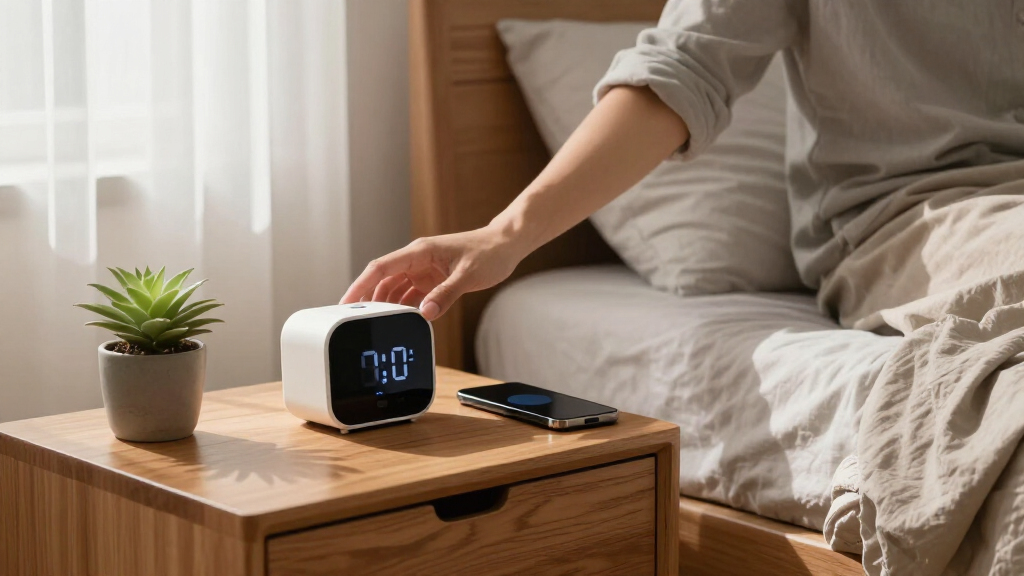
Alarm clocks with wireless charging pads promise to replace multiple nightstand gadgets—clock, phone charger, and light. Their true value lies in reducing cable clutter and providing a consistent phone place, but effectiveness depends on proper alignment, alarm reliability, and device compatibility.
Imagine waking up and your phone is already charged, ready for the day. No tangled cables, no searching for a charger in the dark. Alarm clocks with wireless charging pads aren’t just about waking you up—they’re about transforming your nightstand into a sleek, clutter-free zone.
By combining your alarm, phone charging, and even a bedside light into one device, you cut down on clutter and make your mornings smoother. But not all models perform equally. The key lies in how well your phone aligns, how reliable the alarm remains, and whether the device supports your tech setup. This guide will walk you through everything you need to know to turn your nightstand into an efficient, calming hub.
Magnetic alignment systems like Qi2 significantly improve charging reliability, especially in low-light or accidental bump scenarios.
A good wireless alarm clock balances display adjustability, alarm dependability, and case compatibility for a hassle-free experience.
Choosing between a flat pad and magnetic stand depends on your space and how you prefer to view your phone—stand for visibility, pad for stealth.
Ensure your phone’s case isn’t too thick or metal-laden, or wireless charging may not work overnight.
Prioritize safety certifications and proper power adapters to protect your devices and sleep environment.
Nightstand Tech · Buyer’s Guide
Alarm Clocks with Wireless Charging Pads: Nightstand Consolidation
One device replaces three: the clock, the phone charger, and often the bedside light. The real value is less cable clutter and a consistent home for your phone — but only if alignment, alarm reliability, and compatibility are done right.
Key Insight
Over 80% of wireless charging failures are caused by misalignment — magnetic systems like Qi2 are the game-changer.
3→1
Gadgets consolidated per nightstand
2023
Qi2 introduced magnetic alignment
15W
Max common advertised output — actual speed varies
<3mm
Safe case thickness for reliable wireless charging
80–90%
Where adaptive charging pauses to protect battery
2008
Qi standard debut — 15 years before Qi2 magnets
01 · The Consolidation Case
Why Wireless Charging Changes the Nightstand
No cords snaking across the bed, no fumbling for a cable in the dark, and less wear on your phone’s charging port. A fixed charging spot turns a chaotic corner into a calm one.
Dock at Night
Place the phone on the clock’s pad — it starts charging while you sleep. No cables to plug.
Charge Consistently
Proper alignment keeps power steady all night instead of intermittent failed sessions.
Wake Up Ready
The alarm sounds, the display shows the time, and the phone is full — three jobs, one device.
Clutter-Free Zone
Fewer tangled wires, fewer gadgets, and a calmer, organized bedside environment.
Peak wattage matters less overnight than stable alignment and good heat management. A “15W” pad does not guarantee every phone charges at 15W — alignment, case thickness, temperature, and the supplied adapter all cut real-world speed.
02 · Charging Standards
Qi vs. Qi2 — What You Need to Know
Qi has been the standard since 2008. Qi2 (2023, Wireless Power Consortium) adds standardized magnetic alignment derived partly from Apple’s MagSafe — a snap that ends the nightly “wiggle to find the spot” ritual.
Older or inexpensive clocks may be Qi-compatible without being Qi2-certified. Some use proprietary magnets or a magnetic ring that doesn’t deliver full Qi2 functionality. Check for the Qi2 logo, not just the word “magnetic.”
03 · Form Factor
Flat Pad or Magnetic Stand?
Your habits and space decide it: stands for visibility, pads for stealth. Here’s how the two nightstand setups compare head-to-head.
| Criteria | Flat Pad | Magnetic Stand |
|---|---|---|
| Alignment reliability | ~ Finicky — needs precise placement | ✓ Magnet snaps into the sweet spot |
| Viewing the clock/phone | ✗ Screen faces up only | ✓ Angled, landscape display modes |
| Clutter profile | ✓ Sleek, low-profile, discreet | ~ More prominent footprint |
| Earbud cases & odd shapes | ✓ Flat surface fits most cases | ✗ Requires magnetic compatibility |
| Nighttime bumps | ✗ Phone can slip off-coil | ✓ Magnetic hold all night |
04 · Compatibility
Case Compatibility: How Thick Is Too Thick?
Wireless charging works through most nonmetallic cases — think of it as listening through a wall. Slim silicone is fine; metal plates, card holders, grips, and bulk are the blockers. Treat the manufacturer’s stated limit as a maximum, never a guarantee.
Beyond 5mm, or with metal inlays, remove the case or switch to a thinner one. Always test before relying on overnight charging — a drained phone at 6 AM defeats the whole setup.
05 · Heat & Battery Health
Overnight Charging: The Real Deal
Wireless charging generates more heat than wired because energy transfer is less efficient — and misalignment makes it worse. Heat is a double-edged sword: necessary, but damaging if prolonged.
Never Cover the Device
Bedding or a pillow over the phone traps heat, slowing charging or triggering protective shutdowns.
Certified Thermal Management
Reputable chargers monitor temperature and foreign objects, cutting power before overheating.
Adaptive Overnight Charging
Modern phones pause at 80–90% and finish just before your alarm — less time at 100%, less battery stress.
Alignment = Cooler Charging
A phone sitting correctly on the coil wastes less energy as heat. Magnets help here too.
06 · Alarm Reliability
Pick a Clock That Truly Wakes You Up
Evaluate it as an alarm first and a charger second. If the alarm doesn’t go off, the fanciest wireless pad in the world won’t save your morning.
Power Resilience
Battery Backup
Keeps the clock and alarm running during an outage — but it normally won’t keep charging the phone.
Scheduling
Dual Alarms & Schedules
Separate weekday and weekend wake times, with clearly separated alarm and snooze buttons.
Wake Experience
Volume & Gradual Wake
Adjustable alarm volume or gradual ramp-up, plus one-touch cancellation without menu diving.
Sleep Quality
Display Dimming
Multiple dimming levels, auto night mode, or full display-off. A bright display can disturb sleep.
Accuracy
Auto Time Sync
Automatic time synchronization means no blinking “12:00” after a power cut — ever.
Power Input
Correct USB-C PD Adapter
An underpowered adapter means slow charging, flickering, resets, or disabled secondary ports.
Why Wireless Charging on Your Nightstand Changes Everything
Wireless charging on a nightstand isn’t just a fancy feature; it’s a game-changer. It eliminates the clutter of cords snaking across your space. Instead of plugging and unplugging every night, your phone rests on a spot that’s always ready to juice up.
For example, picture a busy parent rushing in the morning—no more fumbling for a cable. Just place the phone on the clock, and it starts charging while you sleep. It’s about turning a chaotic space into a calm, organized corner. Plus, fewer cables mean fewer tangled wires and less wear on your phone’s charging port.
alarm clock with wireless charging pad
As an affiliate, we earn on qualifying purchases.
As an affiliate, we earn on qualifying purchases.
The Charging Standard: Qi or Qi2 — What You Need to Know
Most wireless chargers use the Qi standard, which has been around since 2008. Qi2, introduced in 2023, adds magnetic alignment—think of a tiny magnet snapping your phone into exactly the right spot. This simple tweak can make a huge difference in charging speed and reliability.
For instance, if you’ve ever had to wiggle your phone to find that perfect spot on a charger, Qi2’s magnetic system is a relief. It guides your phone into position, reducing failed charges and wasted energy. A 15W Qi2 charger can deliver faster, more stable power, but support varies by phone and case.
Remember, a charger’s advertised wattage doesn’t always match real-world speed. Alignment, case thickness, and temperature all impact how fast your phone actually charges overnight. The key is steady, consistent contact—not peak wattage.
bedside alarm clock with magnetic Qi2 charging
As an affiliate, we earn on qualifying purchases.
As an affiliate, we earn on qualifying purchases.
Flat Pad or Magnetic Stand? Which Nightstand Setup Works Best?
Choosing between a flat wireless charging pad and a magnetic stand depends on your habits and space. Flat pads are sleek and discreet, fitting easily on any nightstand. But they can be tricky to align perfectly, especially if your phone is thick or has a bulky case. This misalignment can cause inconsistent charging, which might leave your device uncharged or partially powered through the night. Such inconsistency can lead to waking up with a drained phone, defeating the purpose of a nightstand charging setup.
Imagine trying to position your phone just right, only to find it slips or doesn’t charge. That’s where a magnetic stand shines. It holds your phone at an angle, making it easier to see notifications or check the time without picking up the device. Additionally, the magnetic hold ensures the phone stays in the correct position, reducing the risk of misalignment during the night, which is crucial for reliable charging.
For example, a magnetic stand might be perfect if you like to glance at your phone in landscape mode while lying in bed. Conversely, a flat pad is better if you want minimal clutter or if you use wireless earbuds with a case that fits better on a flat surface. Both setups have tradeoffs: flat pads offer simplicity but require precise placement, while magnetic stands provide better alignment but might take up more space or look more prominent.
wireless charging alarm clock for nightstand
As an affiliate, we earn on qualifying purchases.
As an affiliate, we earn on qualifying purchases.
Case Compatibility: How Thick is Too Thick?
Wireless charging works through most nonmetallic cases, but thick or metal ones can block the signal. Think of it like trying to listen through a thick wall—sometimes it works, sometimes it doesn’t. The material and thickness of your case directly affect whether your phone can charge overnight. For example, a slim silicone case up to 3mm thick generally allows effective charging, but beyond that, especially with metal components or card slots, the signal may be hindered or blocked completely.
Choosing a case that is too thick or contains metal inlays can prevent your phone from charging altogether, which can be frustrating if you rely on wireless charging for convenience. This means that even the best wireless charger won’t work if your case is incompatible. It’s important to consider both the material and the thickness of your case and to verify your charger’s recommended case specifications. Sometimes, magnetic alignment can help improve contact with certain cases, but it’s not a guaranteed solution for all incompatible materials.
In practical terms, if your case exceeds 5mm or contains metal, you should consider removing it or switching to a compatible, thinner case to ensure reliable overnight charging. Always test your setup before relying solely on wireless charging, especially if you use a bulky or metal-laden case during the day.
Heat, Battery Health, and Overnight Charging — What’s the Real Deal?
Wireless charging generates more heat than wired charging, especially if your phone isn’t perfectly aligned or if the charger’s surface isn’t well-designed. Excess heat can accelerate battery aging over time, which is a critical consideration for those who plan to use wireless charging nightly. Think of heat as a double-edged sword—necessary for charging but potentially damaging if it’s excessive or prolonged. Overheating can cause your battery to degrade faster, reducing its overall lifespan and performance.
Modern phones include thermal management systems that slow or pause charging if they detect dangerous heat levels. Reputable chargers also monitor temperature and foreign objects, shutting down or reducing power to prevent overheating. For example, if bedding or a pillow covers your phone during charging, heat can build up, possibly leading to slower charging or even shutdowns to protect the device. Using adaptive or optimized overnight charging algorithms can help mitigate these risks by pausing charging at around 80-90% and completing just before waking, which reduces stress on the battery.
In essence, wireless charging can be safe overnight if you follow best practices: ensure proper alignment, avoid covering the device, and use certified chargers with good thermal management. Recognizing the tradeoff between convenience and potential battery wear is important for long-term device health.
Alarm Reliability: How to Pick a Clock That Truly Wakes You Up
The alarm is king. No matter how fancy the wireless charging, if the alarm doesn’t go off, your morning is off to a rough start. Reliable alarm features are essential; look for models with backup batteries, multiple alarms, and tactile snooze controls to ensure you wake on time even during power outages. The backup battery is particularly critical, as it guarantees your alarm will sound regardless of power failures, which can happen unexpectedly. Large, tactile buttons for snooze and volume make it easier to operate in the dark without fumbling, ensuring you can quickly respond without delay.
Moreover, consider alarms with features like separate weekday and weekend settings or gradual wake-up sounds that can help you wake more naturally. A dependable alarm clock that integrates seamlessly with your wireless charging setup reduces the risk of oversleeping or missing important appointments. Remember, the most sophisticated wireless charging features won’t matter if your alarm fails to wake you up. Reliability hinges on both the alarm’s internal mechanisms and the stability of your phone’s charging. Ensuring your device charges consistently and your alarm is dependable creates a morning routine you can trust.
Display Quality: Bright, Dim, or Off? Finding the Perfect Nightlight
A bright display might look attractive in the store, but it can disturb your sleep. Look for models with adjustable brightness, night mode, or the ability to turn off the display entirely. The ideal display balances visibility with sleep comfort. Features like automatic dimming or night mode can significantly improve your sleep quality by reducing light pollution from your alarm clock. For example, some clocks offer a gradual dimming feature that dims the display as you fall asleep, minimizing disturbance. Others have ambient light sensors that adjust brightness based on room lighting conditions, ensuring the clock remains unobtrusive.
If you’re sensitive to light, consider a clock with a truly off setting or a very low nightlight. Also, check the viewing angles—your phone or clock should be visible from your bed without reflections or glare. A subtle glow from the alarm clock can be a sleep disruptor, so choosing a model with customizable display settings allows you to create a cozy, dark environment conducive to restful sleep. The right display setup is key to maintaining your sleep environment’s tranquility.
Power Adapter and Setup: What Do You Really Need?
Some models come with a power adapter, others require you to supply your own. For reliable overnight charging, a good wattage—usually 18W or higher—is recommended. This ensures the device runs smoothly and charges your phone efficiently. Using a high-quality, certified power adapter minimizes fluctuations that could cause charging interruptions or device resets during the night. For example, a 30W USB-C Power Delivery charger provides stable, fast power, ensuring your device remains charged without interruption. Cheaper or underpowered adapters may cause inconsistent charging, flickering, or even device resets, which can disrupt your sleep routine and compromise your phone’s readiness in the morning.
Always check if the clock requires a specific input—most now use USB-C, making it easier to find compatible adapters. Remember, a stable power supply means fewer surprises during the night and a more reliable wake-up experience. Investing in a quality power setup is crucial for consistent operation and peace of mind.
Compatibility with Wearables and Earbuds: What to Watch For
Many wireless earbuds and smartwatches support Qi charging, but compatibility varies widely depending on device design and placement. For earbuds, cases often contain small coils that need precise placement on the charging pad; slight misalignment can result in slow or failed charging sessions. Some cases are designed with larger coils or magnetic alignment to improve contact. For smartwatches like the Apple Watch, dedicated charging docks or pucks are required, as they are incompatible with standard phone pads. Using incompatible setups can lead to frustration or incomplete charging, especially if you rely on these devices daily.
For example, AirPods Pro cases are often Qi-compatible and can be charged on the same pad as your phone, but only if positioned correctly. Conversely, a Samsung Galaxy Watch typically needs its dedicated charger, which is designed specifically for its form factor. Always verify your wearables’ compatibility before purchase. A “three-in-one” clock might include a dedicated charger for your watch or earbuds, but ensure your specific models are supported to avoid disappointment or inefficiency in your charging routine.
In short, not every Qi charger works seamlessly with all wearables—double-check your gear’s specs and compatibility to ensure a hassle-free experience.
Safety Certifications and What They Really Mean
Look for chargers with official certifications like Qi or Qi2, which guarantee interoperability and safety. These include protections against overheating, overcurrent, and foreign objects, ensuring your device remains safe during nightly use. Certification marks from reputable testing organizations indicate that the charger has undergone rigorous safety testing, reducing risks of electrical faults, fires, or damage to your device. Devices lacking these certifications may pose safety hazards, especially when left unattended overnight. For example, a charger with a recognized safety mark is designed to shut down or lower power if it detects abnormal conditions, safeguarding your device and your sleep environment.
Beware of vague claims like “Qi compatible” without certification—these are often marketing fluff and do not guarantee safety or reliable operation. Prioritizing certified models from reputable brands ensures your nightstand setup is both safe and dependable, giving you peace of mind as you sleep.
Always select models with clear safety certifications and reputable brand backing—your sleep depends on it.
Design and Nightstand Ergonomics: Making It Work for You
The best design choices turn a good device into a great nightstand companion. Consider whether the phone remains centered after placement, and if the alarm and snooze buttons are easy to find in the dark. Good ergonomics ensure quick, frustration-free operation, especially during those early morning moments when your eyes are still adjusting. Devices with tactile buttons and a stable surface reduce accidental slips and misalignments, which can lead to charging failures or missed alarms. Routing cables out of sight not only keeps your space tidy but also minimizes the risk of accidental disconnections or tripping hazards during nighttime routines.
Moreover, a display that’s easily visible from your bed without glare or reflections enhances usability. If your phone is large, confirm it fits comfortably on the stand without covering essential controls. Consider whether the device can operate in landscape mode if you like to watch videos or use bedside apps—this flexibility can add to your comfort and convenience. Good ergonomic design makes your nightly routine smoother and your device more reliable, turning it into a trusted part of your sleep environment.
Connectivity and Privacy: Do You Need Smart Features?
Basic alarm clocks don’t require internet or app integration, offering a straightforward, reliable experience. Smart models, however, bring added functionalities like voice control, sleep tracking, and remote adjustments, but they also introduce considerations around privacy, security, and setup complexity. For example, a simple clock with physical buttons keeps your data private and minimizes setup time, making it ideal for those who prefer a fuss-free, distraction-free environment. On the other hand, smart clocks connected to Wi-Fi or Bluetooth may collect data or be vulnerable to hacking if not properly secured. They can also require ongoing updates and troubleshooting, which might be inconvenient during your sleep routine.
Think about your priorities: do you want a minimalist, dependable device, or are you interested in advanced features that might enhance your sleep analysis or smart home integration? For many, the peace of mind that comes with a basic, offline alarm clock with wireless charging outweighs the benefits of smart features. Ultimately, your choice should align with your comfort level with technology and your desire for simplicity versus functionality.
Choose based on your comfort with connectivity and your desire for extra features—simplicity often wins for a bedside device.
Frequently Asked Questions
Will my phone charge through its case?
Most phones will charge through nonmetallic cases up to about 3mm thick. Thicker or metal cases, or those with cards or magnetic plates, can block wireless charging. Always check your charger’s recommended case thickness and materials for best results.
Is wireless charging safe overnight?
Yes, if your charger is certified and your phone supports thermal management. Modern devices include protections that prevent overheating. Just avoid covering the phone with bedding and use a charger with proper safety features.
Will overnight wireless charging damage my battery?
Not inherently. Heat and extended high charge levels accelerate aging, but adaptive charging systems and proper heat management help mitigate damage. Wireless charging is safe as long as your device and charger are certified and used properly.
Do I need a special wall adapter?
For models supporting higher wattages (like 15W or more), a USB-C Power Delivery adapter of at least 18W is recommended. Using an underpowered adapter can cause slow charging, flickering, or resets. Check the device’s specifications for the right power supply.
Can I charge my earbuds or smartwatch on these devices?
Many earbuds cases support Qi charging, but placement can be tricky due to smaller coils. Smartwatches like the Apple Watch need dedicated docks—they won’t charge on a standard phone pad. Always verify device compatibility before buying.
Conclusion
Streamlining your nightstand with an alarm clock that wires your phone overnight isn’t just about aesthetics—it’s about creating a calm, organized space that supports your mornings. When you select a model with reliable alarm features, magnetic alignment, and good safety standards, you set the stage for better sleep and smoother wake-ups.
Imagine a nightstand where everything you need is in one place—phone, alarm, maybe even a tiny lamp—all working seamlessly. That’s the simple power of consolidation. Why not make your sleep space smarter and less cluttered tonight?
Flea & tick season Picks
flea and tick prevention
As an affiliate, we earn on qualifying purchases.