
TL;DR

Get wellness gear delivered free with Prime
- Fast, free delivery on millions of items
- Prime Video, Amazon Music and more included
- Member-only deals all year
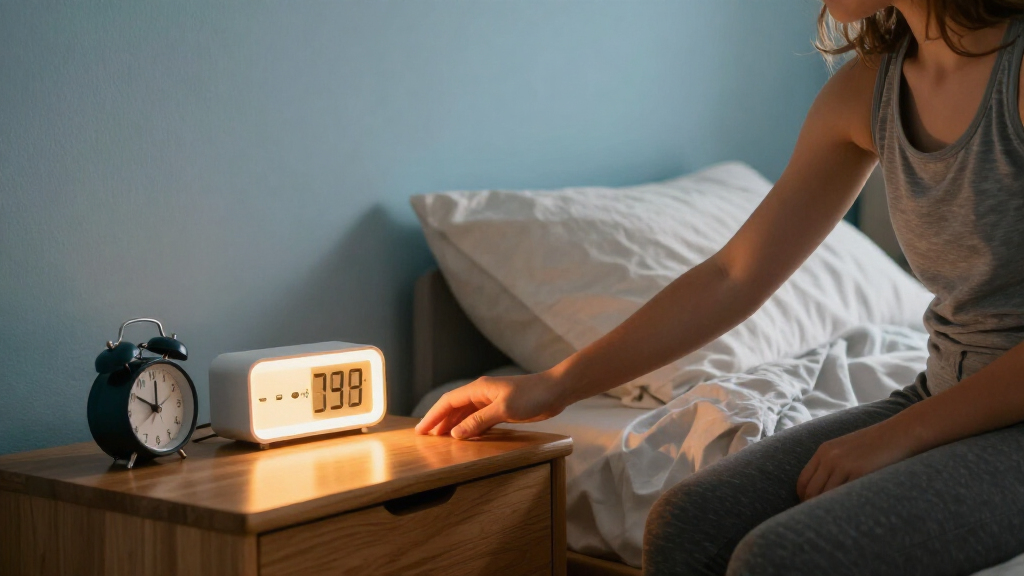
Analog clocks make the movement of time visible and can give children practice with hour and minute hands; digital clocks show the time at a glance. Choose based on your child’s skills, check that the alarm and controls are manageable, and pay attention to display brightness, sound, and safe placement.
A child can read 7:00 on a glowing screen and still wonder whether it is time to get up. An analog clock can show the hands moving toward morning, but it may take practice to read. The right choice depends on what your child can use and what your family wants the clock to do.
This guide compares analog and digital alarm clocks for children, from time-telling practice to alarm buttons and nighttime light. You’ll get a practical way to match a clock to your child’s age, preferences, and morning routine, plus details that are easy to miss when you’re focused on the display.
A clock can become one small part of a steady routine. It can support independence over time, but it won’t guarantee that a child wakes on their own. Start with the features your child will actually use, then keep the setup simple.
Choose analog when a clear clock face can support practice with hour and minute hands; choose digital when your child benefits from seeing the time quickly.
Check that the alarm is audible from the bed and that your child or caregiver can stop and reset it without a confusing button sequence.
Dim or switch off a bright digital display, and listen for ticking if your child is sensitive to sound.
Place the clock on a stable surface where your child can see it safely, with cords away from the bed and a secure battery compartment.
Treat OK-to-wake colors as routine cues; they are different from an alarm and work best when paired with clear, steady expectations.
A practical guide • Family routines
Analog vs. Digital Alarm Clocks for Children
One makes the movement of time visible; the other shows the time at a glance. Choose the format your child can understand and use, then check the alarm, light, sound, and placement.
Numbers show now.
A clock can support independence and a steady routine over time, but it cannot guarantee a child will wake on their own.
01 / Compare the formats
What does each clock make easy to see?
Both can help with routines. Their displays answer slightly different questions, and features vary by model.
| What to compare | Analog clock | Digital clock |
|---|---|---|
| How time appears | Moving hands on a numbered or marked face | Numerals on a screen |
| Learning | Makes hour and minute hands, and time passing, visible | Shows the current time quickly, especially for children who know numbers |
| Ease of use | Reading takes practice; clear markings and distinct hands can help | Usually quick to read; setting alarms may involve buttons or menus |
| At night | May need illumination or a nearby night-light | Easy to read in darkness, but a bright display may disturb sleep |
| Alarm and extras | Often straightforward; features vary | May offer adjustable volume, multiple alarms, or gradual sound |
“What time is it?” can be quick to see digitally. “How far along are we toward seven?” is more visible on an analog face.
02 / Match the child
Start with the skills and routine
Age is only a rough clue. Interest, number recognition, time-telling practice, and comfort with controls differ from child to child.
Choose analog for the clock face
A clear face with large numerals, minute marks, and distinct hands can make practice easier. An adult can talk through the hands at first.
Choose digital for instant reading
Numerals may be simpler for a child who recognizes numbers but still finds clock faces confusing, or wants a quick check before getting up.
Give each clock a job
An analog clock in a shared space can support learning while a simple digital alarm in the bedroom handles the morning signal.
03 / A three-step check
Try it together before choosing
Use a real moment from your day, such as getting dressed or deciding whether there is time for breakfast.
Check readability
Ask your child to tell you the time. For analog, look for clear numerals and an easy-to-distinguish short and long hand.
Check the alarm
Listen from the bed, then practice stopping it. Decide who will reset it so the next morning is clear.
Check the routine
Decide whether the main job is learning, checking the time at night, or signaling a morning wake-up.
04 / Bedroom setup
Make the alarm manageable and the room comfortable
Test the sound and controls before relying on the clock for a school morning. A loud, startling alarm is not automatically better, and extra features help only when your family will use them.
05 / Routine cues
Know what the clock is signaling
Colors and symbols can help make expectations visible, but they are a separate feature from the alarm itself.
Pick a display your child can understand today.
Show what the time means and how to stop the alarm.
Set clear, steady expectations for staying in bed or getting up.
Keep a caregiver check-in if your child still needs help waking.
See What Analog and Digital Clocks Teach at a Glance
Analog clocks show time passing through moving hands, while digital clocks show the current time in numerals. That difference shapes what a child sees and learns each time they check the clock. A child practicing hour and minute hands may benefit from an analog face; a child who recognizes numbers but still finds clock faces confusing may find a digital display easier to read.
Think of an analog clock like a little carousel: the hands travel around a fixed path, and their positions tell a story about how much of the hour has passed. A digital clock is more like a scoreboard: it gives you the current result quickly. Both are useful, but they answer slightly different questions. “What time is it?” is easy to see digitally; “How far along are we toward seven?” is more visible on an analog face.
When choosing a clock, try a real-life check. If your child is getting dressed and asks whether there is time for breakfast, can they read the display without help? An analog clock with large numbers, clear minute marks, and distinct hands can make practice less frustrating. For a child who needs a quick glance before getting out of bed, bright, well-sized digital numbers may be simpler.
| What you’re comparing | Analog clock | Digital clock |
|---|---|---|
| How time appears | Moving hands on a numbered or marked face | Numbers on a screen |
| Time-telling practice | Makes hour and minute hands visible | Shows the current time quickly |
| Nighttime reading | May need illumination or a nearby night-light | Can be easy to read, but the display may be bright |
| Features | Often simple, though designs vary | May offer volume settings, multiple alarms, or gradual sound |
Neither display tells you which clock needs to go in your child’s room. Your child’s confidence, the alarm controls, and the room’s light and sound matter too.
Products Worth Considering

EGO Power+ 9‑Gallon Wet/Dry Shop Vacuum with Remote Control (WDV0900) – Battery Not Included

Metabo HPT 18V 30° Cordless Paper Tape Framing Nailer Kit (NR1890DCA)

EGO POWER+ Cordless Leaf Blower, 765 CFM, with 5.0Ah Battery (LB7654)
As an affiliate, we earn on qualifying purchases.
Choose a Clock That Matches Your Child’s Skills
Choose a clock your child can understand and use with the right amount of help. Age can offer a rough clue, but interest, number recognition, time-telling practice, and comfort with buttons all vary from child to child. There is no single age when every child needs an alarm clock.
A younger child might enjoy looking at the hands on a large, colorful analog face while a caregiver talks through the morning: “The short hand is near seven.” A child who already reads numbers may prefer to see 6:45 immediately on a digital display. Neither preference says anything about the child’s ability; it simply tells you which format makes the routine clearer today.
Try this three-step check before deciding which format is a good fit:
- Check readability: Ask your child to tell you what time the clock shows. For analog, look for clear numerals, a distinct short hour hand, and a longer minute hand.
- Check the alarm: Show your child how to stop it. If they’re ready, practice resetting it together so the morning doesn’t depend on a confusing button sequence.
- Check the routine: Decide whether the clock is mainly for learning, seeing the time at night, or signaling a morning wake-up.
For example, a child who gets anxious about being late might appreciate the quick certainty of digital numbers. A child who wants to know how long remains before breakfast could use an analog clock as a visual prompt, with an adult explaining the hands at first.
You can also use both formats. A simple analog clock in a shared space can support time-telling practice, while a digital alarm clock in the bedroom handles the morning signal. Keep expectations gentle: a clock can support a routine, but a parent may still need to wake a young child or help them learn what the alarm means.
Make the Alarm Easy to Hear and Easy to Stop
A useful alarm is audible to your child and simple enough for them to stop or reset when appropriate. A loud, startling sound is not automatically better, and a clever feature won’t help if your child can’t find the off button. Test the sound and controls together before relying on the clock for a school morning.
Digital clocks often provide more alarm choices, such as adjustable volume, multiple alarms, or a sound that starts quietly and grows louder. Those options can help a family find a sound that gets a child’s attention without jolting them. Analog clocks are often straightforward, though alarm functions vary by model. Either way, listen from the child’s bed: a sound that seems loud beside the clock may be faint under a quilt or behind a closed bedroom door.
Imagine a child who has just started getting dressed without a reminder. If they can turn off the alarm but don’t know how to set it for the next day, the routine can stall. Spend a few calm minutes practicing: point out the alarm switch, let the child press it, and explain who will reset the time. For a younger child, a caregiver can manage setup while the child learns to recognize the sound and what happens next.
Keep the controls manageable. Too many buttons or menus can turn bedtime into a puzzle, especially when a child is tired. If you are comparing digital alarm clocks, check whether the alarm works without an app or internet connection and whether a child can accidentally change the settings. A simple clock with one dependable alarm may suit the routine better than a model packed with options.
Some children sleep through an alarm or need an adult’s help to wake. That can depend on the child, the sound, and the household routine; it is not a reason to shame them. Use the clock as one cue in the morning, alongside a predictable caregiver check-in if needed.
Keep Bedroom Light and Ticking Comfortable
For a bedroom clock, choose a display and sound your child can live with throughout the night. Digital numbers may be easier to read in darkness, but a bright screen can feel like a small lamp pointed at the bed. Analog faces are usually harder to see without light, though illuminated hands or a separate night-light may help.
Brightness is personal. One child may like seeing a dim digital display from under the blankets, while a sibling may turn toward the glow and keep noticing it. If a screen faces the bed, look for a display that can be dimmed or switched off. Try the room in its usual nighttime lighting: what looks subtle in a bright shop can stand out against a dark wall.
Sound deserves the same practical check. Some analog clocks tick, and some children barely notice; others find each click as distinct as a tiny tap on the window. A quiet model or one with a sweep second hand may suit a sensitive sleeper. If you already own a clock, let your child listen to it in the room before deciding it has to go.
For example, a caregiver might place a digital clock on a dresser with its brightness turned down, then check from the pillow whether the numbers still shine directly into the child’s eyes. Another family might keep a quiet analog clock on a shelf and use a nearby night-light for reading its face. The practical test is simple: the clock should be easy enough to use without making the room feel busy.
Newer children’s clocks may add color-changing lights, countdowns, or gradual alarms. Those features can be useful when a family will actually use them, but extra lights or sounds can also distract. Start with a plain display and add a feature only when it solves a specific routine problem.
Place the Clock Where Your Child Can Use It Safely
Put the clock where your child can see it, and keep cords and unstable objects away from the bed. A readable display loses its value if a child has to climb, stretch over furniture, or get out of bed to check it. The best spot depends on the room layout, the child’s reach, and whether the clock plugs in or runs on batteries.
A low dresser or stable bedside shelf may work for an older child who can reach the controls safely. For a younger child, placing a clock slightly out of reach can prevent late-night button pressing while leaving the display visible. Keep any power cord tucked along a wall and away from where a child sleeps or walks; check that the clock won’t wobble if bumped.
Here’s a familiar scenario: a digital display sits at the foot of the bed, but its light beams straight into the child’s face. Turning the display toward a wall or moving it to a side table may solve the problem without changing clocks. With an analog face, the challenge may be the opposite: the child can’t see the hands from bed. A small position adjustment or gentle night-light might be enough.
Check the battery compartment as well. A secure cover helps keep small batteries inaccessible to young children. If the clock uses rechargeable power or USB, follow the manufacturer’s setup guidance and keep charging cables out of the sleep area.
Simple placement reduces little morning snags. Your child can learn where to look and how to reach the alarm without climbing or tugging at cords, and you can keep the clock from becoming a nighttime toy. Revisit the setup as your child grows or the bedroom changes.
Use Wake-Up Lights as a Routine Cue, Not a Time-Telling Lesson
An OK-to-wake clock uses a visual cue to signal when a child may get up; an alarm clock signals a set time. Some products combine both functions, using a color or symbol alongside an audible alarm. The two jobs can support a family’s routine in different ways, so it helps to know which one you need.
A color-changing light may be useful for a child who can’t yet read the time. For instance, a parent might explain that a blue light means it is still quiet time and a green light means it is time to get up. The child learns the household rule through a visible cue rather than through minute-by-minute clock reading. Pair that cue with consistent, kind reminders; a light by itself does not teach a child what to do.
That difference matters when you’re choosing a clock. If the goal is practicing hour and minute hands, a clear analog face offers that practice more directly. If the goal is a quick morning signal, a digital alarm can be easier to read. If the goal is helping a young child follow a stay-in-bed routine, a visual cue may fit, but it does not replace the alarm or guarantee a child will wake independently.
Features vary, so check whether a combined clock lets you dim or turn off the light, silence an alarm, and set the cue without a complicated app. A family with a bright hallway may not need another glowing device; a child who responds well to colors may enjoy the prompt. Use the feature only if it makes the household routine clearer.
Keep the message simple and repeat it in the daytime, when everyone is calm. “When the light turns green, you can come find us” is easier to follow than a long set of nighttime rules. That small bit of consistency can make the visual cue feel predictable.
Follow a Short Checklist Before You Bring a Clock Home
Before buying, test readability, alarm operation, sound, brightness, and placement against your child’s actual routine. Product descriptions can make every feature sound helpful, but the useful question is whether your child can use it comfortably in their room. A short checklist keeps the decision grounded in everyday needs.
- Display: Can your child read it from the place they’ll check it? For analog, inspect the hands and markings; for digital, check number size and contrast.
- Alarm: Can your child hear it, and is the volume adjustable? Practice turning it off and resetting it if they are ready.
- Nighttime: Can you dim or switch off the screen? If it ticks, listen in a quiet bedroom.
- Controls: Are the buttons or settings easy for an adult to manage and age-appropriate for the child?
- Power and placement: Does it sit securely? Are batteries covered and cords kept away from the sleep area?
- Extra features: Will a countdown, colored light, or multiple alarm genuinely help, or will it add another thing to manage?
Picture a child who needs a weekday alarm but shares a room with a sibling. Adjustable sound and a dim display may matter more than a time-learning feature. For a child excited to learn clock faces, a clear analog dial might bring more value than a screen full of settings.
Features like USB power, rechargeable batteries, app controls, and gradual alarms appear on some newer clocks, but they vary by model and can change over time. Check current specifications before buying. Marketing language doesn’t guarantee a feature will improve sleep; the question is whether it makes your particular routine easier.
Keep the tradeoff in view: the more features a clock offers, the more settings someone may need to manage. A simple clock can be enough. If you want both time-telling practice and a reliable wake-up cue, two basic clocks in different parts of the home may work better than one complicated device.
Frequently Asked Questions
Is an analog or digital alarm clock better for a child?
Neither format is best for every child. Analog clocks show hour and minute hands, which can support clock-face practice; digital clocks show the time at a glance. Choose the one your child can read and use comfortably.
At what age should a child get an alarm clock?
There is no single right age. You can introduce a clock when your child becomes interested in time or starts following a morning routine. A younger child may need you to set the alarm and explain what it signals.
Can an alarm clock help my child wake up independently?
An alarm can become part of a wake-up routine, but it does not guarantee independent waking. Your child may need help understanding the sound, using the controls, or getting up. Practice together and keep caregiver support in place when needed.
Will a digital clock’s light disturb my child?
A bright display may be bothersome if it shines toward the bed. Try a dimmable or switchable display, then check the room from your child’s pillow. Turning the clock or moving it can help too.
Are OK-to-wake clocks the same as alarm clocks?
No. An alarm signals a set time, while an OK-to-wake clock uses a visual cue such as a color or symbol. Some devices combine both. Explain what the cue means and repeat the routine consistently.
Should my child’s clock tick?
It depends on your child’s comfort. Some children don’t notice ticking, while others find it distracting in a quiet room. Listen to the clock at bedtime and consider a quiet or sweep-second-hand option if the sound bothers them.
Conclusion
Pick the clock your child can read and use comfortably. Analog can make the movement of time visible; digital can make a quick time check easier. Then test the alarm, check the light and sound from the bed, and place the clock where it’s safe to reach.
A good clock doesn’t need to run the whole morning. It only needs to offer one clear cue, like a small lighthouse in a familiar room, while your family builds the routine around it.