Among these smart alarm clocks for kids, the Cozyla Routie is my best overall pick for families who want a visual routine, chore support, and rewards in one device. The Echo Dot Kids stands out for audio stories and voice-led sleep routines, while the ANALOI OK-to-Wake keeps things simpler for children learning when it is time to get up. The main tradeoff is between rich interactive features and a straightforward clock that is easy to manage at bedtime. Families should also weigh voice assistant access, screen use, and whether a child needs an independent wake-up cue or parent-guided routines. Read on for the full breakdown and a guide to choosing the right fit.

Get wellness gear delivered free with Prime
- Fast, free delivery on millions of items
- Prime Video, Amazon Music and more included
- Member-only deals all year
Key Takeaways
- Cozyla Routie is the strongest routine-focused pick in this lineup because its calendar, chore chart, and reward features go beyond a basic wake-up signal.
- Echo Dot Kids and Echo Spot serve different households: the Kids model emphasizes child-oriented audio and sleep routines, while Echo Spot is a more general smart alarm clock.
- Simple wake cues remain useful. ANALOI and Azyh focus more directly on sleep training and visual night-light signals than the models built around assistants or entertainment.
- Several picks add engagement through stories, AI, or a digital pet, but these extras can make bedtime controls and screen or audio boundaries more important for parents.
- Dual alarms and adjustable lighting are practical differentiators for siblings, changing schedules, or children who need a softer bedroom light rather than a single fixed setup.




| smart alarm clocks for kid | Display | Power | Dimensions |
|---|---|---|---|
| Kids Digital Alarm Clock with | 7-inch LED touchscreen | Corded electric; adapter included | 7 in W × 5.5 in H |
| Echo Dot Kids | — | — | 3.9 × 3.9 × 3.5 in |
| PRUNUS AI Companion Alarm Cloc | Digital | Corded electric | 2.2 in W × 4.3 in H |
| Amazon Echo Spot Smart Alarm C | 2.83-inch touchscreen, 240 × 320 pixels | — | 4.5 × 4.1 × 4.4 in |
| ANALOI Kids’ OK-to-Wake Alarm | Digital | USB charging; 1 CR2032 battery included | 4.38 in W × 4.43 in H |
| Pawpal Kids Alarm Clock with N | Digital touchscreen | Corded electric | 3.97 in W × 4.25 in H |
| Azyh Kids Sleep Trainer Alarm | Digital | Corded electric; USB connectivity | — |
| MikoDream Kids Digital Alarm C | Digital | One AAA battery | — |
| Cozyla Routie Kids’ Digital Al | 7-inch digital touchscreen | Corded electric | — |
| JAHUYU Smart Alarm Clock for K | Digital | AC adapter; one C battery included | — |
More Details on Our Top Picks
Kids Digital Alarm Clock with 7-Inch Touchscreen, Custom Reminders, and Night Light
I rank this clock highest for families who want a dedicated routine hub rather than a speaker-first device. Its 7-inch touchscreen, up to 21 customizable alarms, and preset voice-guided routines give parents room to shape reminders around school mornings, chores, or bedtime. The countdown timer, soothing sounds, adjustable night light, and scheduled dimming also bring several routine tools into one tabletop device. Compared with the ANALOI OK-to-Wake Clock, which keeps its focus on a simple red-to-green wake cue, this model offers much more scheduling flexibility but may take longer for an adult to set up. It is also less suitable for children who want Alexa-style audio content: unlike the Echo Dot Kids, it is not presented as a connected audiobook or music speaker. The tradeoff is a large, capable display that needs an outlet and may be feature-heavy for younger users.
Pros:- Large touchscreen makes the time and routine controls easy to see.
- Up to 21 customizable alarms and preset routines support varied schedules.
- Night light, soothing sounds, and scheduled dimming add bedtime options.
- Six display languages suit multilingual households.
Cons:- Corded power limits placement to areas near an outlet.
- Parents may need to configure alarms and routines before a child can use them independently.
- The number of features may be more than a child needs for a basic wake-up routine.
Best for: Parents who want one plug-in tabletop device for customized reminders, bedtime sounds, and a visible daily routine.
Not ideal for: Families seeking a portable, battery-powered clock or a Wi-Fi speaker for audiobooks and voice-assistant content.
- Display:7-inch LED touchscreen
- Power:Corded electric; adapter included
- Alarms:Up to 21 customizable alarms and 22 preset scene alarms
- Countdown timer:Up to 60 minutes
- Soothing sounds:6 nature sounds
- Night light:3 brightness levels
- Languages:English, Spanish, French, German, Italian, and Dutch
- Dimensions:7 in W × 5.5 in H
Our verdict“Choose this clock if you want a large-screen routine station with flexible reminders, and skip it if a simple wake light or portable speaker matters more.”
Echo Dot Kids – Smart Speaker with Age-Appropriate Audiobooks, Sleep Routines & Alexa+ Experiences (Owl Design)
The Echo Dot Kids is the strongest fit here for families who want bedtime audio and a voice-controlled speaker alongside alarms. Its Sleep Studio, age-appropriate audiobooks, music, and parental controls make it more of a connected audio companion than a traditional visual sleep trainer. Compared with the 7-Inch Touchscreen Kids Clock, it offers a broader audio and assistant experience, but it lacks that model’s large display and detailed collection of customizable alarm and reminder options. The ANALOI OK-to-Wake Clock is a clearer choice when the main goal is teaching a child when to stay in bed; this Echo Dot instead helps with listening and bedtime routines. Wi-Fi and an Amazon account are required, and offline use is limited. Parents should also account for the need to manage connected features and content through its controls rather than treating it as a simple standalone clock.
Pros:- Sleep Studio provides calming sounds and bedtime routines.
- Access to kid-focused audiobooks and ad-free podcasts is a clear audio advantage.
- Parent Dashboard, remote monitoring, and a mic-off button offer management controls.
- Includes a two-year worry-free replacement guarantee.
Cons:- Requires Wi-Fi and an Amazon account, with limited offline functionality.
- Does not provide the large visual routine display found on the 7-Inch Touchscreen Kids Clock.
- The product is not described as a toy and may not suit rough handling by younger children.
Best for: Families whose children enjoy audiobooks and calming audio, and whose parents want remote content and device controls.
Not ideal for: Households without reliable Wi-Fi or an Amazon account, or parents who want a screen-based wake light that works independently.
- Dimensions:3.9 × 3.9 × 3.5 in
- Weight:10.7 oz
- Speaker:1.73-inch front-firing speaker
- Wi-Fi:Dual-band 802.11a/b/g/n/ac, 2.4 and 5 GHz
- Bluetooth:BLE Mesh, A2DP, and AVRCP support
- Parental controls:Amazon Kids Parent Dashboard
- Sleep features:Sleep Studio with calming sounds and bedtime routines
- Guarantee:Two-year worry-free replacement guarantee
Our verdict“Pick the Echo Dot Kids when audio content and parental controls matter more than a dedicated visual wake-up display.”
PRUNUS AI Companion Alarm Clock for Kids with Pomodoro Timer, AI Assistant, and MP3 Player
The PRUNUS takes a different route from the wake-light clocks: its standout feature is a visual Pomodoro timer with 25-minute focus periods and five-minute breaks. That makes it a more relevant fit for children who need help structuring homework or short tasks, while its alarm, reminders, weather forecasts, voice assistant, and TF-card MP3 playback add extra utility. Compared with the 7-Inch Touchscreen Kids Clock, the PRUNUS is aimed more at focus and voice interaction than at a large, easy-to-scan routine screen. It also does not describe the bedtime lighting and soothing-sound setup found on that model. The product data does not specify how its AI assistant connects or whether an account or service is needed, so parents may want clarity before relying on voice features. Its corded power and compact display make it less flexible as a bedside sleep trainer.
Pros:- Visual Pomodoro intervals can make work and break periods easier for a child to follow.
- Combines alarm, reminders, weather forecasts, and voice-assistant features.
- TF-card MP3 playback supports local music playback.
- Offers 12- and 24-hour time formats.
Cons:- Requires corded electric power.
- AI connectivity and service requirements are not specified in the product data.
- The listed dimensions suggest a compact display, with less visual space than the 7-inch touchscreen model.
Best for: Families looking for a tabletop clock that can support homework sessions, reminders, and MP3 playback from a TF card.
Not ideal for: Parents prioritizing a clear OK-to-wake light, a detailed bedtime-light setup, or fully specified connectivity requirements.
- Model:PRUNUS T05
- Display:Digital
- Power:Corded electric
- Timer:Visual Pomodoro timer: 25-minute focus and 5-minute break intervals
- Music playback:MP3 via TF card
- Time format:12- or 24-hour
- Dimensions:2.2 in W × 4.3 in H
- Mounting:Tabletop
Our verdict“Choose the PRUNUS if focus timers and local MP3 playback matter more than a dedicated night light or a clearly defined sleep-training system.”
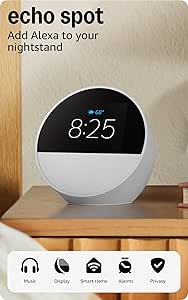
Amazon Echo Spot Smart Alarm Clock with Alexa, Glacier White
The Echo Spot suits parents who want a compact Alexa-enabled bedside clock that can also play music, podcasts, and audiobooks. Its customizable touchscreen shows time, weather, and song titles, while voice control can handle alarms, routines, and compatible smart-home devices. That makes it more connected than the ANALOI OK-to-Wake Clock, whose red and green lights are more direct for teaching wake-up boundaries. Compared with the Echo Dot Kids, the Spot offers a visible screen but the supplied description does not list the same child-specific content and parental-control features. Its display is small at 2.83 inches, so it is not a substitute for the larger routine screen on the 7-inch model. Wi-Fi is needed for connected features, and the eero extension only applies with a compatible router. This is a smart-home pick, not a dedicated sleep trainer.
Pros:- Alexa supports voice-controlled alarms, routines, and compatible smart-home devices.
- Touchscreen displays time, weather, and song titles.
- Built-in speaker plays music, podcasts, and audiobooks.
- Can extend a compatible eero network.
Cons:- The 2.83-inch display is much smaller than the 7-inch touchscreen model.
- Eero extension requires a compatible eero router and account linking.
- Some Alexa skills and services may require a subscription.
Best for: Families already using Alexa or compatible smart-home devices who want a small clock with a touchscreen and voice control.
Not ideal for: Parents seeking a child-focused wake-light system, a large display, or the kid-specific content controls listed for Echo Dot Kids.
- Display:2.83-inch touchscreen, 240 × 320 pixels
- Dimensions:4.5 × 4.1 × 4.4 in
- Weight:14.3 oz
- Wi-Fi:Dual-band 802.11a/b/g/n/ac, 2.4 and 5 GHz
- Speaker:1.73-inch full-range built-in speaker
- Camera:None
- eero extension:Up to 1,000 sq. ft.; compatible eero router required
- Recycled materials:36%
Our verdict“Choose the Echo Spot for Alexa and smart-home routines in a compact format, not for a child-specific sleep-training interface.”
ANALOI Kids’ OK-to-Wake Alarm Clock with Night Light
The ANALOI is the most direct choice in this group for teaching a child when it is time to get up: red and green lights communicate the stay-in-bed and OK-to-wake cues without relying on a voice assistant or complex screen. Its dual alarms, six alarm tones, soothing sounds, and ten-color night light add useful flexibility, while the child lock can help prevent accidental setting changes. Compared with the 7-Inch Touchscreen Kids Clock, it is simpler and more focused, but it gives up the larger display, extensive custom reminders, and preset routines. It also lacks the connected audio library of the Echo Dot Kids. The compact size should suit a bedside table, though parents should note that the listing describes six alarm tones and seven soothing sounds separately, which may make the sound options less clear. USB power limits placement, with a CR2032 backup included.
Pros:- Red and green lights give children a straightforward stay-in-bed and wake-up signal.
- Dual alarms can support different weekday and weekend schedules.
- Ten night-light colors, three brightness levels, and an auto-off timer offer bedtime flexibility.
- Child lock helps reduce accidental setting changes.
Cons:- The listing separates six alarm tones from seven soothing sounds, so the sound options may take clarification.
- USB corded power limits placement, while the included CR2032 battery is described as backup power.
- It has fewer custom schedule and reminder features than the 7-Inch Touchscreen Kids Clock.
Best for: Parents teaching a young child to stay in bed until a set time, especially those wanting a simple color-based cue and night light.
Not ideal for: Families who want a large schedule display, customizable reminder system, or Wi-Fi audio and assistant features.
- Display:Digital
- Power:USB charging; 1 CR2032 battery included
- Alarms:Dual alarms
- Alarm tones:6
- Soothing sounds:7
- Night light:10 colors and 3 brightness levels
- Auto-off timer:15–60 minutes
- Dimensions:4.38 in W × 4.43 in H
Our verdict“Pick the ANALOI for a simple color-cued wake-up routine, and choose another model if your child needs reminders, rich audio, or a larger display.”
Pawpal Kids Alarm Clock with Night Light, Stories, Music, and Interactive Digital Pet
I’d pick the Pawpal for families who want a clock to make routines feel interactive, not just mark bedtime and wake-up. Its puppy or kitten reward system gives children ages 3–8 a playful reason to complete daily tasks, while the app lets parents set schedules, adjust the light, and add voice messages. Stories, music, and podcasts also give it more bedtime entertainment than the simpler Azyh sleep trainer, whose main strength is clear red-and-green wake cues. The tradeoff is extra setup: Pawpal requires app configuration and a system update before use, and its battery or charging details are not specified. Choose it if engagement matters more than plug-in simplicity; skip it if you want a straightforward clock with fewer setup steps.
Pros:- Combines alarms, an adjustable night light, and stories, music, and podcasts.
- App controls let parents manage schedules, light settings, and voice messages.
- Interactive pet rewards can make daily tasks more appealing to young children.
Cons:- First use requires app setup and a system update.
- Battery life and charging details are not provided.
Best for: Parents of children ages 3–8 who want app-managed routines and a pet-style reward to encourage daily habits.
Not ideal for: Families seeking a plug-and-play clock or clear information about backup power and battery life.
- Recommended age:3–8 years
- Display:Digital touchscreen
- Power:Corded electric
- Mounting:Tabletop
- Dimensions:3.97 in W × 4.25 in H
- Weight:0.6 kg
- Audio:Stories, music, and podcasts
- Controls:App-managed alarms, schedules, light settings, and voice messages
Our verdict“Choose Pawpal if a digital pet and app-managed routines are more useful to your child than the simpler wake cues of the Azyh.”
Azyh Kids Sleep Trainer Alarm Clock with Dual Alarms and Color Night Lights
The Azyh is my pick for children who need a simple visual signal for when to stay in bed and when to get up. Red stay-in-bed and green wake-up lighting make the routine easier to understand than the Pawpal’s more reward-centered approach, while two alarms can cover different schedules. Eleven night-light colors, five brightness levels, music, and a child lock add flexibility without turning this into an audio-content hub. Its 20-minute pre-alarm countdown offers another cue before the set wake time. The main limitation is power: it needs a cord, with no battery operation listed, so it is less flexible if bedside outlets are scarce or outages matter. I’d choose it for dependable visual boundaries, not for stories, voice features, or extensive parent app controls.
Pros:- Red and green lights provide an easy-to-understand stay-in-bed and wake-up routine.
- Two alarms support different schedules.
- Eleven light colors and five brightness levels allow bedside adjustments.
- Child lock helps prevent accidental setting changes.
Cons:- Requires corded power; battery operation is not listed.
- Its 10 music tracks offer less listening variety than clocks with story libraries or microSD playback.
Best for: Parents of early risers who want red/green sleep cues, two alarm settings, and controls children are less likely to change accidentally.
Not ideal for: Families who need battery-powered operation, app-based management, or a clock that plays stories and podcasts.
- Display:Digital
- Power:Corded electric; USB connectivity
- Alarms:2
- Music:10 tracks
- Night-light colors:11
- Brightness:5 levels
- Pre-alarm countdown:20 minutes
- Dimensions and weight:4.53 in W × 2.36 in H; 0.23 kg
Our verdict“Choose the Azyh for clear visual sleep cues and a child lock, but pick Pawpal if your child responds better to interactive rewards and audio content.”
MikoDream Kids Digital Alarm Clock with Dual Alarms and Adjustable Night Light
MikoDream suits families who want basic alarm and night-light functions without adding app setup or a corded bedside connection. Its dual alarms, five ringtones, and four volume levels give parents a few ways to tailor wake-ups, while the voice-activated light can respond without a separate control routine. The shake-to-snooze feature and playful expressions may also make the clock approachable for children. Compared with the Azyh, MikoDream trades explicit red-and-green sleep-training cues and a child lock for battery-powered operation and a more playful interaction. That makes it less of a dedicated sleep trainer. The listing calls for one AAA battery, so buyers should check what that means for ongoing replacement, and the supplied dimensions appear unusually small. I’d favor it for simple bedside use, not for precise sizing or advanced routine controls.
Pros:- Battery-powered design avoids a required corded bedside connection.
- Dual alarms, five ringtones, and four volume levels offer basic scheduling flexibility.
- Voice-activated night light and shake-to-snooze add child-friendly controls.
- Playful expressions make the display less utilitarian.
Cons:- Requires one AAA battery, with no additional power details provided.
- Listed dimensions may be inaccurate, making fit difficult to judge.
Best for: Families who want a compact-feeling, battery-powered kids’ clock with dual alarms and a voice-activated night light.
Not ideal for: Parents who need clear OK-to-wake lighting, a child lock, or confidence in the listed physical dimensions.
- Display:Digital
- Power:One AAA battery
- Alarm settings:Dual alarms
- Ringtones:5
- Volume:4 levels
- Night light:Adjustable brightness; voice-activated
- Snooze:Shake to snooze; repeats after 5 minutes
- Warranty:180 days
Our verdict“Choose MikoDream for a simple battery-powered clock; choose the Azyh instead if your priority is a defined stay-in-bed and wake-up routine.”
Cozyla Routie Kids’ Digital Alarm Clock with Calendar, Chore Chart, Night Light, and Routine Rewards
Routie is the most routine-focused option here: it brings together a calendar, chores, voice-guided reminders, and star rewards on a 7-inch touchscreen for children ages 4–12. Sunrise lighting and white noise extend its role beyond alarms, while voice-cloned stories offer a more personalized bedtime than the MikoDream’s ringtones and simple snooze. I also value its no-camera design and physical microphone switch for families who want a clear way to disable listening. The tradeoff is reliance on a larger connected device: it needs corded power and Wi-Fi or Bluetooth, and some features require a paid membership. Compared with Pawpal’s pet-based motivation, Routie is better suited to older children managing several parts of a day; it may be more system than a family needs for one wake-up cue.
Pros:- Combines routines, chores, a calendar, and star-based rewards.
- Sunrise light and white noise support both bedtime and wake-up.
- No camera and a physical microphone switch offer direct privacy controls.
- Voice-guided reminders and personalized voice-cloned stories add routine support.
Cons:- Some features require a paid membership.
- Needs corded power and Wi-Fi or Bluetooth connectivity.
Best for: Families with children ages 4–12 who want one bedside touchscreen for calendars, chores, guided routines, and rewards.
Not ideal for: Buyers who want an inexpensive-to-run standalone alarm, do not want connected features, or prefer a small, simple clock.
- Recommended age:4–12 years
- Display:7-inch digital touchscreen
- Power:Corded electric
- Connectivity:Bluetooth and Wi-Fi
- Controls:App control; adjustable brightness and volume
- Features:Calendar, chores, voice-guided routines, and star rewards
- Night and wake features:Sunrise light, night light, white noise, and OK-to-Wake
- Dimensions and weight:6.28 in W × 8.43 in H; 2.2 lb
- Warranty:1 year
Our verdict“Choose Routie if your child needs a connected hub for chores and daily routines; choose Pawpal for a smaller, pet-centered approach.”
JAHUYU Smart Alarm Clock for Kids with AI Voice Assistant, Sleep Trainer, and Night Light
JAHUYU is the most flexible pick for families who want an alarm clock to support more than sleep. It combines a wake-up light, sleep sounds, multiple alarms, and three timer modes, including Pomodoro, countdown, and count-up. Those timers give children a way to practice focused work or track activities—something neither the Azyh’s red/green cues nor MikoDream’s shake-to-snooze is designed to do. A microSD card can hold music, stories, or study audio, which may reduce dependence on streaming for playback. The tradeoff is setup complexity: AI voice features and automatic time/date updates need 2.4 GHz Wi-Fi, while the listing does not clarify whether the clock works without its AC adapter. I’d pick it for timers and local audio, but not if you want an especially simple sleep trainer.
Pros:- Combines alarms, a wake-up light, sleep sounds, and timers.
- Pomodoro, countdown, and count-up modes support time-management practice.
- MicroSD playback can store music, stories, and study audio.
- Multiple alarms, three soothing alarm sounds, and 10 volume levels allow adjustment.
Cons:- AI voice features and automatic time/date updates require 2.4 GHz Wi-Fi.
- The listing does not clarify whether it can operate without the AC adapter.
Best for: Families with school-age children who want sleep sounds, wake-up lighting, study timers, and microSD audio in one device.
Not ideal for: Buyers who need a clearly documented battery-powered option or want AI and automatic time updates without 2.4 GHz Wi-Fi.
- Display:Digital
- Power:AC adapter; one C battery included
- Connectivity:Bluetooth, voice control, and Wi-Fi
- Wi-Fi requirement:2.4 GHz for AI voice features and automatic time/date updates
- Sleep sounds:12 types of white noise or calming music
- Alarm settings:Multiple alarms, 3 soothing sounds, and 10 volume levels
- Timer modes:Pomodoro, countdown, and count-up
- Sleep timer:15, 30, 45, 60, 90, or 120 minutes
- Audio playback:microSD card
Our verdict“Choose JAHUYU for timers and microSD audio; choose the Azyh if your main goal is a simpler red-light/green-light sleep routine.”

How We Picked
I compared these clocks by how well their features address the everyday jobs parents and children need them to do: signal wake-up time, support bedtime routines, provide useful night lighting, and make schedules easier to follow. I also looked at the role of voice assistants, stories, timers, routine charts, and interactive features, since added functions can help some children while creating extra setup or distraction for others. Ease of use, flexibility for different ages, and the likelihood that a family can set clear boundaries around audio and screens all shaped the assessment.
The ranking favors products with a clear purpose and features that work together, rather than a long list of extras alone. Cozyla Routie leads for its broad routine support; Echo Dot Kids follows for audio-centered family use, while simpler wake-training models rank well for focused needs. Products with AI, entertainment, or general smart-speaker functions may suit particular homes, but they are not automatically better for a child’s bedroom. I also distinguish between features stated in the product names and details that families should verify before purchase, such as connectivity, parental controls, and how alarms are configured.
| smart alarm clocks for kid | Power |
|---|---|
| Kids Digital Alarm Clock with | Corded electric; adapter included |
| Echo Dot Kids | — |
| PRUNUS AI Companion Alarm Cloc | Corded electric |
| Amazon Echo Spot Smart Alarm C | — |
| ANALOI Kids’ OK-to-Wake Alarm | USB charging; 1 CR2032 battery included |
| Pawpal Kids Alarm Clock with N | Corded electric |
| Azyh Kids Sleep Trainer Alarm | Corded electric; USB connectivity |
| MikoDream Kids Digital Alarm C | One AAA battery |
| Cozyla Routie Kids’ Digital Al | Corded electric |
| JAHUYU Smart Alarm Clock for K | AC adapter; one C battery included |
Factors to Consider When Choosing Smart Alarm Clocks For Kids
Before choosing a clock, decide what problem you want it to solve. A child who wakes too early may need a clear visual cue, while a child who resists routines may benefit more from a chart or reward system. These broader choices can matter more than adding another speaker feature or entertainment option.
Choose the wake-up method your child will understand
Children differ in how they interpret time, so a clock face alone may not help a young child know whether it is morning. A color or other visual wake cue can make the rule easier to follow without requiring the child to read a digital time display. Before buying, check how the signal changes and whether it can be seen from the bed. Avoid assuming that every night light doubles as a sleep-training cue. For older children, a conventional alarm may be enough, while younger children may need a consistent visual signal paired with a parent’s explanation.
Set boundaries around voice assistants and connected features
A voice assistant can make routines and audio easier to access, but it also raises questions about what a child can request and when the device is listening. Review parental controls, account requirements, microphone settings, and available content before placing a connected speaker in a bedroom. A device that depends on an app or network may be less convenient during setup or a connection outage. Families who want a simple wake cue may prefer a model with fewer connected functions. The useful question is not just what the assistant can do, but which functions parents can limit.
Treat bedtime audio as a separate decision
Stories and music can become part of a calming routine, but they may also keep a child engaged after lights-out. Check whether playback can be scheduled, stopped automatically, or controlled by a parent. Think about whether your child settles better with familiar audio or tends to ask for one more story. Avoid choosing a model for a large library alone if you cannot manage access and listening time in a way that fits your household. For audio-light homes, a basic clock with an effective wake signal may be the better match.
Match the routine tools to the job your child needs help with
A chore chart, calendar, timer, or reward system can support different parts of a day, but each adds setup and upkeep. Start by identifying one recurring friction point, such as getting dressed or packing a bag, rather than expecting a clock to manage every habit. A Pomodoro timer may suit schoolwork, while a visual routine chart may be more useful during mornings. Check who will update tasks and whether the child can understand the system without constant adult help. Extra functions are most helpful when the family has a plan to use them consistently.
Check lighting and placement in the actual bedroom
A night light should be comfortable from the child’s bed and not so bright that it interferes with settling down. Adjustable color or brightness can help a clock adapt as a child’s preferences change, but controls should be easy to operate without turning bedtime into a play session. Consider the clock’s display visibility, button access, and proximity to a power outlet. A feature-rich touchscreen may need a different placement from a compact clock with physical controls. Check the product details for power and backup behavior rather than assuming the alarm will behave the same during an outage.
Plan for siblings and changing schedules
Dual alarms can help when children share a room or when one child follows different weekday and weekend schedules. They do not solve every problem: alarm volume, placement, and the risk of waking a sibling still matter. If schedules change often, look for controls that make editing alarms straightforward for the adult who manages them. A single alarm may be simpler for a child with one stable wake time. Choose flexibility only when it addresses a real household need, since extra settings can make a basic routine harder to maintain.
Frequently Asked Questions
Should I choose a smart speaker clock or a dedicated sleep-training clock?
Choose based on the main problem you are trying to solve. A smart speaker clock is a stronger fit when your child will benefit from stories, music, or voice-led routines and you are comfortable managing connected features. A dedicated sleep-training model is often easier to explain when the main goal is teaching a child when to stay in bed or get up. Think about whether the added audio and assistant functions will help your family or create more bedtime requests. Check parental controls and alarm behavior before deciding.
Do children need a clock with an AI assistant?
Most children do not need AI features to learn a wake-up routine. An assistant may appeal to families looking for conversational functions, timers, or audio access, but it can add setup, privacy, and supervision questions. Confirm what the assistant can access and whether parents can restrict requests or disable features. If your child mainly needs a light cue or a standard alarm, a simpler model may be easier to use consistently. Treat AI as an optional function, not a substitute for a clear routine.
Is a touchscreen a good choice for a child’s bedroom?
A touchscreen can make calendars, reminders, or routines easier to display, particularly when a child benefits from visual prompts. It can also invite tapping and screen use at bedtime, so consider your child’s habits before choosing one. Check whether the display can be dimmed or controlled at night and whether key settings can be locked or managed by an adult. If the clock is meant mainly to signal wake-up time, a model with simpler controls may reduce distractions. The right choice depends on whether the screen supports a routine you will actually use.
Will a dual-alarm clock solve scheduling problems for siblings?
Dual alarms can separate wake times or weekday and weekend schedules, making them useful in some shared rooms. They cannot prevent one alarm from disturbing a sibling, especially if both children sleep close to the clock. Consider where the device can be placed and whether each alarm can be set clearly without frequent adult correction. If children have the same schedule, a single alarm may be easier to manage. Check the product’s alarm settings and sound options rather than relying on the dual-alarm label alone.
What should I check before buying a clock with stories or music?
Find out how content is accessed, whether a network or account is required, and what parental controls are available. Look for playback limits or a sleep timer if you want audio to stop after bedtime. Consider whether your child can choose content independently and whether that freedom is likely to delay sleep. Audio features can support a calming routine, but they are less useful if managing them becomes a nightly task. Also check whether the clock still provides its core alarm functions when connectivity is unavailable.
Conclusion
My best overall choice is the Cozyla Routie for families who want routines, chores, and rewards in one place. For a best value in straightforward wake training, I would start with the ANALOI OK-to-Wake; it focuses on a clear sleep-training purpose rather than a broad set of connected extras. The Echo Dot Kids is my best premium-style pick for audio routines, while the Azyh sleep trainer is a sensible best-for-beginners direction for households prioritizing simple wake cues and night lights. For specific needs, choose the PRUNUS if a timer and MP3 player fit your child’s routine, or the MikoDream if dual alarms and adjustable lighting matter most. If your priority is a general Alexa clock rather than child-focused sleep training, compare the Echo Spot with the kids-oriented speaker before deciding.