TL;DR

Get wellness gear delivered free with Prime
- Fast, free delivery on millions of items
- Prime Video, Amazon Music and more included
- Member-only deals all year
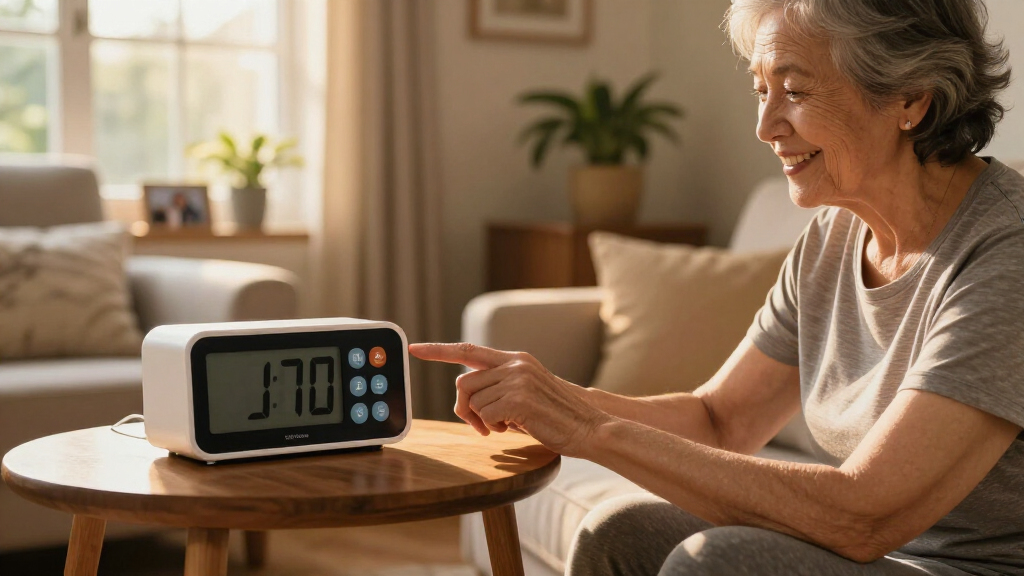
The best alarm clock for a grandparent is one that’s simple to read, easy to set, and dependable. Focus on large display, straightforward controls, and reliable backup power to reduce morning confusion and frustration.
Getting a grandparent up and out of bed can be a challenge — especially if they struggle with small buttons, confusing displays, or hearing difficulties. The right alarm clock can make mornings smoother, less stressful, and more independent. But with so many options out there, how do you pick the one that’s truly easy to use?
This guide cuts through the noise to help you find a clock tailored to your grandparent’s needs. Whether they have limited vision, hearing loss, or dexterity issues, you’ll learn what features matter most and how to test them at home. Because the goal isn’t just a fancy gadget — it’s a device your grandparent can trust every morning.
Prioritize large, high-contrast displays that are easy to read from bed.
Choose clocks with dedicated, simple controls and minimal setup complexity.
Match alarm types (sound, vibration, flashing light) to the individual’s hearing and sleeping style.
Test the clock in the actual bedroom environment before finalizing the purchase.
Avoid overly feature-rich models that depend on smartphones or Wi-Fi unless the user is comfortable with technology.
Helping Grandparents Choose an Easy-to-Use Alarm Clock
The best clock is the one they can read, set, hear, and trust. Prioritize clear information, obvious controls, an appropriate alert, and dependable backup power—not the longest feature list.
Large digits, strong contrast, and comfortable nighttime brightness.
Dedicated buttons and only a few obvious steps.
Backup power that preserves settings—and ideally sounds the alarm.
Check readability from the usual sleeping position.
The alarm should be set without consulting a manual.
Volume, vibration, light, or a useful combination.
Real lighting, distance, noise, and nighttime routines matter.
Six features that make a clock genuinely easier
A large display alone is not enough. The complete experience—from setting the alarm to recovering after a power failure—must feel predictable.
Large, high-contrast digits
Digits should remain clear across the bedroom. Adjustable brightness prevents glare from disturbing sleep.
One button, one purpose
Choose clearly labeled, dedicated controls instead of touchscreens, hidden menus, or multifunction buttons.
Obvious alarm setting
Frequently used controls should be visible and reachable—not underneath or behind the clock.
The right signal
A lower-pitched tone, increasing volume, flashing light, or vibration may work better than maximum loudness.
Distinct stop and snooze
Large, textured buttons that feel different help prevent accidental shutoff during a sleepy moment.
Meaningful backup power
Confirm whether the battery sounds the alarm during an outage or merely saves the settings.
Start with the user—not the product category
Age does not determine the right design. Invite your grandparent to compare options and use respectful language such as “accessible,” “clear,” or “convenient.”
| User need | Best-fit features | Watch for |
|---|---|---|
| Reduced vision | ✓Large digits, strong contrast, adjustable brightness, spoken time | ~Glare, thin numerals, unexplained icons |
| Hearing loss | ✓Adjustable volume, lower tones, vibration, bed-shaker accessory | ~Harsh high tones or volume-only solutions |
| Limited dexterity | ✓Large buttons, knobs, generous spacing, nonslip base | ~Small switches and tightly grouped controls |
| Memory difficulties | ✓Day and date, morning/evening indicator, routine-based alarms | ~Cluttered menus and ambiguous alarm indicators |
| Heavy sleeping | ✓Increasing volume, multiple alert modes, vibration | ~Easy accidental shutoff |
| Light sensitivity | ✓Dimmable or fully dark display | ~Always-on bright screens |
| Frequent travel | ✓Compact size, battery operation, simple time-zone adjustment | ~Dependence on Wi-Fi or a phone app |
Try it where it will actually be used
A store display cannot reproduce distance, nighttime confusion, hearing-aid routines, background noise, or bedroom glare.
Place it
Use the intended bedside location and normal viewing distance.
Read it
Check visibility without glasses if that reflects the nighttime routine.
Set it
Set and reset the alarm without opening the manual.
Hear it
Test sound, vibration, and light with the usual hearing setup.
Interrupt it
Unplug the clock and verify what the backup really does.
Usability checks
- Alarm indicator: Is activation unmistakable?
- Independent settings: Can brightness and volume be adjusted separately?
- Safe controls: Is it easy to stop but difficult to disable accidentally?
- Settings memory: Does it remember the alarm when unplugged?
Ownership checks
- Stable placement: Does the base resist sliding?
- Safe cable: Can the cord be positioned without creating a fall hazard?
- Simple upkeep: Are batteries and accessories easy to obtain?
- Trial flexibility: Can the clock be returned after home testing?
Put everyday usability ahead of novelty
This practical priority scale reflects how strongly each factor contributes to a dependable, low-frustration morning routine.
Voice control
Reduces button use and can make setting or checking an alarm easier.
Best when speech recognition is reliableSunrise simulation
Gradually brightens the room to support a gentler waking experience.
Best for light-responsive sleepersSmart displays
Can add reminders, calendars, weather, family messages, and video calling.
Best for confident technology usersAutomatic time updates
Can handle outages and seasonal time changes with less manual adjustment.
Best when troubleshooting is availableMore features can create more failure points
The strongest choice is often a familiar, well-labeled clock that performs a small number of tasks consistently.
Buying by digit size alone
Large numbers cannot compensate for confusing controls, tiny labels, or hidden alarm buttons.
Assuming louder is always better
The wrong pitch may remain inaudible or feel stressful. Compare tone, vibration, and light.
Ignoring nighttime brightness
A display can be readable and still interfere with sleep. Test the lowest brightness setting.
Choosing touch controls by default
Flat icons can be difficult to see, locate, or press accurately with limited dexterity.
Depending completely on Wi-Fi
A required app, account, or connection can turn a basic alarm into a support task.
Skipping the power-outage test
Some batteries save settings without sounding the alarm. Verify the exact backup behavior.
Keep cords away from walking paths, use a stable nonslip surface, avoid painfully loud alerts, and choose brightness that supports sleep. Sudden changes in hearing, vision, sleep, or orientation should be discussed with an appropriate healthcare professional.
What features make an alarm clock truly easy for seniors?
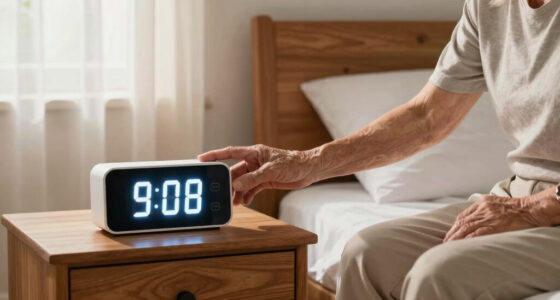
An alarm clock becomes genuinely helpful when it’s simple to read, set, and trust. Look for a large, high-contrast display — digits should be bold and visible from across the room. Adjustable brightness prevents the display from shining so brightly it disturbs sleep.
Controls should be dedicated, clearly labeled buttons. Avoid touchscreen or multifunction buttons that can confuse or slow down setting the alarm. The process of setting the time and alarm should be straightforward, ideally requiring just a few obvious steps.
Think about alert types. For heavy sleepers or those with hearing loss, a louder tone, a vibration pad, or flashing lights may be more effective than a soft beep. Large, textured snooze and stop buttons that feel different from each other help prevent accidental shut-offs.
Don’t forget a battery backup. It keeps the clock running during power outages, and it’s a good idea to confirm whether the backup simply preserves settings or also sounds the alarm.
large display alarm clock for seniors
As an affiliate, we earn on qualifying purchases.
As an affiliate, we earn on qualifying purchases.
How to match an alarm clock to your grandparent’s specific needs?
Everyone’s sleep and wake needs are different. A person with reduced vision benefits from large digits, high contrast, and adjustable brightness. Someone with hearing loss might need adjustable volume, lower-pitched tones, or a vibrating bed-shaker.
For limited dexterity, look for large buttons spaced out enough for easy pressing. If your grandparent has memory issues, a simple day-and-date display and routine-based alarms can help them stay oriented.
Heavy sleepers might need alarms with increasing volume or vibration. Light-sensitive users may prefer clocks with dimmable displays. And those who travel often should consider compact models with easy time-zone adjustments and battery operation.
Involving your grandparent in the selection process can make a big difference. They might prefer a traditional clock face over digital, or a model with familiar sounds. Respect their comfort zone — it’s about what will work consistently, not what’s technically fancy.
easy-to-set digital alarm clock for elderly
As an affiliate, we earn on qualifying purchases.
As an affiliate, we earn on qualifying purchases.
What should you check before buying a new alarm clock?
Before making a purchase, run through a quick checklist to ensure the clock will work well in your grandparent’s bedroom. First, verify if the display is readable from their usual sleeping position. If they wear glasses, make sure the digits are large enough without straining.
Next, see if they can set the alarm easily without a manual. Practice setting and stopping the alarm during the day, ideally in the bedroom environment, to catch issues like poor lighting or background noise.
Check if the alarm volume is loud enough with their hearing aids or normal hearing routine. Test whether brightness and volume can be adjusted independently. Confirm there’s a separate indicator showing the alarm is active.
Assess what happens after a power outage. Does the clock keep time? Will it still alarm? Make sure replacement batteries and accessories are available, and consider whether the device can be returned if it doesn’t meet expectations after testing at home.
Doing these quick tests in the actual bedroom helps catch potential problems early, saving frustration later.
vibration and flashing light alarm clock for seniors
As an affiliate, we earn on qualifying purchases.
As an affiliate, we earn on qualifying purchases.
What are the latest innovations in alarm clock design?
Recent alarm clocks include features that go beyond basic beeps. Voice control allows users to set or check alarms simply by speaking, reducing the need to manipulate small buttons. Smart displays can show reminders, weather, or even family messages.
Sunrise simulation gently brightens the room before the alarm sounds, helping wakefulness feel more natural. Vibration pads and wearable alerts are gaining popularity — especially for those who can’t always hear an alarm. Other innovations include automatic time adjustment for daylight saving changes and clocks with USB or wireless charging.
However, these extras can add complexity. Connectivity and setup may require Wi-Fi, apps, or regular updates, which could be confusing or unreliable for some seniors. If simplicity is the goal, a traditional clock with large digits and straightforward controls may still be best.
Ultimately, choosing a clock with the right mix of features depends on your grandparent’s comfort with technology and their specific wake-up needs. Test new features at home first to see if they add value or just create complications.
battery backup alarm clock for seniors
As an affiliate, we earn on qualifying purchases.
As an affiliate, we earn on qualifying purchases.
Avoid these common mistakes when choosing an alarm clock for your grandparent
It’s easy to fall into traps that make a clock less helpful than it seems. Don’t pick a model just because it has the biggest digits. Confusing controls or small, hard-to-find buttons can turn a simple task into a daily frustration. Choosing a clock with overly complicated features or a cluttered interface can lead to confusion, especially if your grandparent isn’t comfortable with technology. The goal is to find a device that simplifies their morning routine, not complicates it.
Assuming maximum volume will fix hearing issues is a mistake — some sounds may be uncomfortable or inaudible at certain frequencies. A vibration pad or flashing light might work better for hearing loss. This tradeoff is important because a loud alarm that is too harsh can cause discomfort or even stress, while ineffective sounds leave the person still asleep or unaware.
Be cautious about touchscreen models if your grandparent has trouble seeing or pressing small icons. Also, don’t overlook display brightness at night — a bright screen can disrupt sleep. Balancing visibility and sleep comfort is key; a clock that allows easy dimming can help maintain healthy sleep patterns.
Don’t buy a clock that depends entirely on an app or internet connection if your grandparent isn’t tech-savvy or prefers a straightforward device. And always verify that the backup batteries will actually sound the alarm, not just preserve settings. This ensures the clock remains functional during power outages, which is critical for reliable wake-up calls.
Finally, avoid rushing the purchase without testing the clock in the bedroom environment. What looks perfect on a store shelf might be awkward in real life. Testing helps identify issues like glare, size, or control difficulty, ensuring the clock will be truly helpful and user-friendly.
Safety tips and health considerations for alarm clocks
An alarm clock should support healthy sleep habits, not replace proper sleep routines. Persistent difficulty waking, tiredness during the day, or confusion upon waking could signal underlying issues needing medical advice.
For safety, avoid flashing-light alarms if your grandparent has photosensitive conditions. Keep loud alarms at a moderate volume and place the clock in a location where it won’t cause tripping or entanglement, especially with cords or accessories like bed-shakers.
Remember, an alarm clock isn’t a substitute for smoke alarms or medical alert systems. It’s a simple aid, not a safety device.
Encourage your grandparent to develop consistent sleep routines and discuss any ongoing sleep issues with their healthcare provider. The alarm clock should complement these habits, not serve as a cure-all.
Frequently Asked Questions
What is the easiest alarm clock for an older adult?
The simplest model features a large, clear display, straightforward controls, adjustable volume and brightness, and reliable backup power. It should be easy to set and stop without confusion, tailored to the user’s vision and hearing needs.Are digital or analog clocks easier for seniors?
Digital clocks with large, bright digits are often easier to read at a glance. However, some may find analog clocks more familiar and comforting. Personal preference and visual ability play significant roles in the choice.How large should the display be?
A display large enough to read comfortably from the bed without glasses is ideal. Consider contrast, font style, and glare as well — these factors affect clarity more than digit size alone.What alarm works best for hearing loss?
Options include adjustable, lower-pitched tones, vibration pads, and flashing lights. Testing different sounds and accessories at home can help determine what’s most effective for the individual’s specific hearing profile.Do vibrating alarm clocks work?
Yes, they’re often very effective, especially for those who remove hearing aids at night. Ensure the vibration unit is compatible with the mattress and strong enough to wake the sleeper safely.Conclusion
Picking an alarm clock for a grandparent isn’t just about size or price — it’s about understanding their needs and making mornings easier. Focus on clarity, simplicity, and dependability. A well-chosen clock can transform waking up from a daily struggle into a moment of calm and independence.
Remember, the best alarm clock is the one your grandparent can operate confidently, trust fully, and rely on every morning. When mornings become easier, so do days filled with more comfort and dignity.
Cold & flu season Picks
humidifiers
As an affiliate, we earn on qualifying purchases.