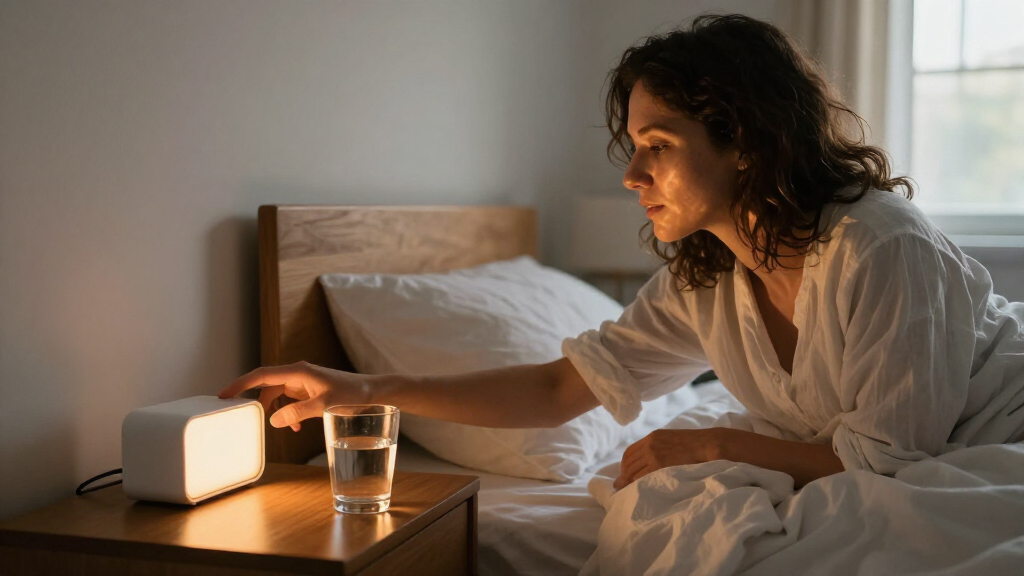

Set up your wake-up light alarm clock to start brightening before your chosen wake time and, if you want, play a sound when it is time to get up. This guide is for beginners setting up a new clock or adjusting one that has not been working as expected. Allow about 20-30 minutes to connect the clock, program it, and test its controls; you will need at least one morning to judge how the light feels in your room.

Get wellness gear delivered free with Prime
- Fast, free delivery on millions of items
- Prime Video, Amazon Music and more included
- Member-only deals all year
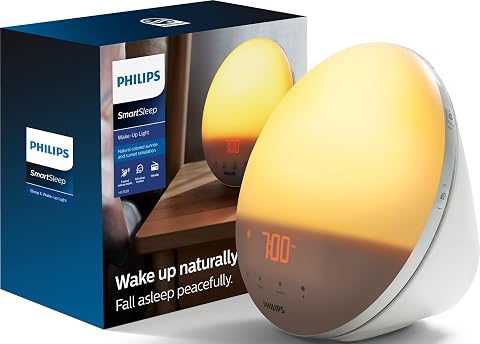
Philips SmartSleep Wake-Up Light with Sunrise and Sunset Simulation, 5 Natural Sounds, FM Radio, Reading Lamp, HF3520/60
- ✔ Model: HF3520/60
- ✔ Light routine: Sunrise and sunset simulation
- ✔ Wake-up sounds: 5 natural sounds

JALL Full-Screen Sunrise Alarm Clock with White Noise, FM Radio, and Bluetooth Speaker
- ✔ Sunrise duration: 10–60 minutes
- ✔ Alarms: Dual alarms; daily, weekday, or weekend routines
- ✔ Snooze: 5–20 minutes
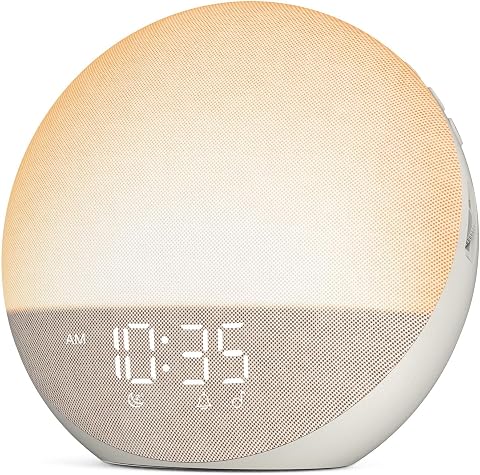
Odokee Sunrise Alarm Clock and White Noise Machine
- ✔ Sunrise simulation: Customizable 5–60 minutes
- ✔ Wake-up modes: 3
- ✔ Sleep sounds: 25
Difficulty: Beginner | Time: 20-30 minutes, plus one morning to evaluate the settings
What You’ll Need
Tools & Materials:
- Wake-up light alarm clock
- Power adapter supplied with the clock
- User manual or the manufacturer’s setup instructions
- Smartphone, if your model requires an app
Knowledge:
- Basic use of buttons, touch controls, or a companion app
- Ability to set the correct time and choose an alarm time
Place the clock where its light can reach your face without shining directly into your eyes. Keep it on a stable surface near an outlet, away from water and anything that could cover the light. Models differ: check the manual for the exact names of sunrise duration, alarm, and brightness settings. A wake-up light can support a morning routine, but it is not a substitute for medical advice about persistent sleep problems.
Philips SmartSleep Wake-Up Light with Sunrise and Sunset Simulation, 5 Natural Sounds, FM Radio, Reading Lamp, HF3520/60
The Philips SmartSleep is the most purpose-built wake-up light in this group. Its sunrise and sunset simulation gives it a broader role than a morning alarm alone: we can use the light to support a gradual start to the day and a more deliberate transition toward bedtime. It also serves as a reading lamp with 20 brightness settings, so its light controls have a practical use beyond the alarm. This makes it the strongest all-round choice for someone who wants the clock to anchor a daily light routine rather than double as a colorful bedside entertainment device.Compared with JALL and Odokee, Philips keeps its sound selection narrower, offering five natural wake-up sounds rather than 25 sleep sounds. It has FM radio, but the supplied details do not describe Bluetooth audio, dual alarms, or colored night-light modes. JALL is the better fit for households that need separate alarms and broader audio options; Odokee offers more sleep sounds and explicit display dimming from 0–100%. Philips counters with the lineup’s clearest reading-lamp function and tap snooze, plus an automatically dimming display that may suit people who dislike a bright clock face overnight.The tradeoff is that this is a more focused, corded tabletop unit, not a flexible audio hub. Its dimensions are not provided, so buyers should confirm that the round body will fit their nightstand, and corded power means placement depends on an outlet. We would skip it if a large sound library, Bluetooth playback, or multiple alarm schedules is the priority. For a buyer whose main goal is a well-rounded sunrise-and-sunset light with useful bedside illumination, it offers the strongest balance in this comparison.
Pros:
- Sunrise and sunset simulation support both morning and evening routines.
- Reading-lamp function with 20 brightness settings adds everyday utility.
- Tap snooze and automatic display dimming support convenient bedside use.
- Includes FM radio and five natural wake-up sounds.
Cons:
- Requires corded electric power, limiting placement to an outlet.
- Offers fewer listed sounds than JALL and Odokee, and no Bluetooth speaker is specified.
- Dimensions are not provided in the supplied product information.
Best for: Buyers who want sunrise and sunset simulation, a reading lamp, and a simple tap-to-snooze routine in one corded tabletop clock.
Not ideal for: Shoppers who need dual alarms, extensive sleep sounds, Bluetooth audio, color-changing ambient light, or verified dimensions before choosing a bedside fit.
Bottom line: We recommend the Philips as the most complete choice for buyers who want a dedicated sunrise-and-sunset light rather than the broadest collection of audio and color features.
“We recommend the Philips as the most complete choice for buyers who want a dedicated sunrise-and-sunset light rather than the broadest collection of audio and color features.”
JALL Full-Screen Sunrise Alarm Clock with White Noise, FM Radio, and Bluetooth Speaker
JALL is the most configurable pick for people who want a wake-up light to coordinate more than one schedule. Its dual alarms and daily, weekday, or weekend routines give couples, families, or shift-pattern households more flexibility than the single-alarm details supplied for Philips and Odokee. Sunrise timing can be set from 10 to 60 minutes, which lets buyers choose a shorter lead-in or a more gradual brightening period. The mix of white noise, 25 natural sounds, FM radio, and Bluetooth makes it the broadest bedside audio option here.That breadth is also the main tradeoff. JALL lists 17 lighting effects, including solid colors and dynamic RGB modes, as well as a 5W Bluetooth speaker and a sleep timer. Buyers who enjoy adjusting their environment may value those choices; someone who simply wants a light that gradually brightens may find the controls and settings more involved than necessary. The Philips is more clearly organized around sunrise, sunset, and reading, while Odokee offers customizable wake modes with a more explicitly dimmable display. JALL’s advantage is not a more focused light routine, but the ability to combine alarm scheduling, sound, radio, and colored lighting in one device.We would choose JALL over Odokee when separate alarms and schedule flexibility are essential, and over Philips when the larger sound selection and Bluetooth playback matter more than sunset simulation. One specific limitation is that Bluetooth time syncing requires a phone, so buyers should not assume every setup step is independent of a mobile device. The feature-rich controls may also take time to configure. This is the best match for a buyer who wants a multifunction bedside hub and is willing to spend some attention setting it up—not the simplest pick for someone seeking a basic sunrise alarm.
Pros:
- Dual alarms and daily, weekday, or weekend routines provide scheduling flexibility.
- Adjustable 10–60-minute sunrise simulation supports different wake-up preferences.
- Includes 25 natural sounds, white noise, FM radio, and Bluetooth audio.
- 17 lighting effects and a sleep timer add nighttime customization.
Cons:
- The many features and controls may require more setup than simpler clocks.
- Bluetooth time syncing requires a phone.
- No sunset simulation or reading-lamp function is specified.
Best for: Households or individuals who need two alarms, different weekly schedules, and a broad mix of sounds, radio, Bluetooth, and lighting effects.
Not ideal for: Buyers who prefer minimal controls, want a dedicated sunset or reading-lamp function, or do not want phone involvement for Bluetooth time syncing.
Bottom line: We’d choose JALL when alarm scheduling and audio variety matter more than keeping the bedside light routine simple.
“We’d choose JALL when alarm scheduling and audio variety matter more than keeping the bedside light routine simple.”
Odokee Sunrise Alarm Clock and White Noise Machine
Odokee is a practical middle ground for buyers who want more choice than a basic sunrise alarm without taking on JALL’s full set of scheduling and lighting features. Its sunrise simulation adjusts from 5 to 60 minutes, giving it the broadest listed timing range here, and it offers three wake-up modes that combine light and sound in different ways. The clearest everyday advantage is its display: brightness can be adjusted from 0–100%, so buyers can set the clock face for visibility or minimize it in a dark bedroom.For nighttime use, Odokee includes 25 sleep sounds, seven alarm sounds, Bluetooth audio through a 5W stereo speaker, and a night light with 12 color options. That is more sleep-sound variety than Philips lists, and it comes close to JALL’s broad bedside-audio appeal. JALL remains the stronger option for dual alarms and weekday or weekend routines; Philips remains better equipped for a reading-lamp role and sunset simulation. Odokee’s distinction is a comparatively direct feature set built around adjustable wake modes and display control, rather than multi-person scheduling or a full light-based evening routine.There are two meaningful gaps to consider before choosing it. The supplied information says no app is required, but also confirms there are no app-based controls, which may matter to buyers hoping to manage settings from a phone. It also does not provide battery or power details, so we cannot establish its power arrangement from the listing information. Compared with Philips, this makes the power setup less clearly documented; compared with JALL, it gives up the stated dual-alarm scheduling. Odokee makes the most sense when its adaptable display and three wake modes address your priorities, but it is not the best pick for buyers who need those missing details resolved in advance.
Pros:
- Customizable 5–60-minute sunrise and three wake-up modes offer flexible morning settings.
- Display brightness adjusts from 0–100%, including the ability to turn it down substantially.
- Includes 25 sleep sounds, seven alarm sounds, and Bluetooth audio.
- 12-color night light adds bedside lighting options.
Cons:
- App-based controls are not available.
- Battery or power details are not provided in the supplied product information.
- No dual-alarm or sunset-simulation function is specified.
Best for: Buyers who want a 5–60-minute sunrise, multiple light-and-sound wake modes, a highly adjustable display, and varied sleep audio.
Not ideal for: Shoppers who need app-based controls, two separate alarm schedules, sunset simulation, or clear power-source details before buying.
Bottom line: Odokee is a strong fit when wake-mode and display adjustments are more important than dual alarms, sunset lighting, or documented power details.
“Odokee is a strong fit when wake-mode and display adjustments are more important than dual alarms, sunset lighting, or documented power details.”
As an Amazon Associate we earn from qualifying purchases.
Before You Start
Choose a wake time you can follow most days, including weekends if possible. Decide whether you want light only, light with a natural sound, or light with a separate backup alarm. Check whether your clock keeps settings during a power cut and whether its alarm must be enabled separately for each day. If it uses an app, install the official app and allow any requested local-device permissions before programming the clock. Avoid relying on a new device as your only alarm on its first morning; keep a familiar backup until you have tested it.
Step-by-Step Instructions
Step 1: Position the clock
Set the clock on a stable bedside table or shelf, at a height near your face when you are lying down. Aim the light toward your bed, but angle the display so it does not glare into your eyes while you are falling asleep. Leave the light panel uncovered and keep the clock within reach if you plan to use its buttons in the morning. Choose a spot near an outlet where the cord cannot be pulled or caught.
Tip:Do not place the clock behind a book, curtain, or other object that blocks the light. If the light shines too directly, turn the clock slightly toward a wall so the room receives reflected light.
Check: The clock is secure, powered within reach of an outlet, and its light can reach your sleeping area without an object in front of it.
Step 2: Connect power and set the clock
Connect the supplied adapter to the clock and a working outlet. Set the current time, checking the hour, minutes, and AM/PM or 24-hour format. If your model offers a date, time zone, or automatic time setting, configure it according to the manual. Confirm the displayed time against a reliable device before setting the alarm.
Tip:Take care with AM and PM. A correct alarm time paired with the wrong half of the day may ring 12 hours away from when you expect.
Check: The clock display shows the correct local time and the correct time format.
Step 3: Choose the alarm time and days
Open the alarm settings and enter the time you want to wake. Select the days the alarm should run, such as weekdays or every day, then save the setting. Look for an alarm indicator on the display or in the app. If the clock supports more than one alarm, label or check each one so an old alarm does not sound unexpectedly.
Tip:Setting an alarm time may not turn the alarm on. Check for a separate alarm on/off control and confirm that the selected days include the next morning.
Check: The intended alarm time and days appear in the settings, and the clock shows that the alarm is enabled.
Step 4: Set the sunrise duration
Choose how long the light should brighten before the alarm time. Select a gradual duration supported by your model; many clocks offer options ranging from a short period to around 30 minutes. If you are new to wake-up lights, start with a middle or longer setting so the increase is gradual. Save the setting and check whether the countdown ends at the alarm time, not after it.
Tip:A longer sunrise begins earlier but does not change the alarm time. If you need to wake at 7:00, a 30-minute sunrise should begin around 6:30 and reach its final level at 7:00.
Check: The selected sunrise duration is saved, and the clock is set to reach its final brightness at your chosen wake time.
Step 5: Adjust light and sound
Set the maximum sunrise brightness to a level that seems comfortable for your room. Choose whether the clock will play a sound at the alarm time, and select a sound and volume if available. If you want light without sound, switch off the sound alarm but leave the alarm and sunrise enabled. If your model has a separate evening light or sunset feature, set it independently from the morning alarm.
Tip:Begin at a moderate brightness and volume. You can raise either setting after testing; an abrupt, overly bright light or loud sound can make the alarm unpleasant.
Check: The saved settings match your preference: light brightness, sound choice, sound volume, and whether sound is on or off.
Step 6: Test the alarm controls
Use the clock’s test function if it has one. Otherwise, temporarily set the alarm a few minutes ahead and observe whether the light starts at the expected time and the sound plays at the alarm time. Check how to snooze, stop the sound, and disable the alarm without erasing its settings. Restore your actual wake time and selected days after the test.
Tip:Some clocks do not run a full sunrise during a short test. If the test checks only sound or buttons, use the manual to confirm the sunrise schedule rather than assuming the light timing is correct.
Check: You know how to stop or snooze the alarm, and the final saved alarm time has been restored after testing.
Step 7: Evaluate the first morning
Keep a backup alarm for the first morning. When you wake, note whether the light began gradually, reached a comfortable brightness, and was easy to notice from your sleeping position. Check whether the sound, if enabled, played at the chosen time. Adjust one setting at a time for the next morning, such as moving the clock, extending the sunrise, or changing brightness.
Tip:Give a setting a few mornings before making several changes at once. A single morning can be affected by tiredness, room lighting, or an unusually late bedtime.
Check: The clock runs on the intended schedule, and you can identify a specific adjustment if the light or sound was too weak, too strong, or poorly timed.
Common Mistakes to Avoid
- Setting the alarm time but leaving the alarm disabled or excluding the next morning. — After saving, check the alarm indicator and confirm the active days include the next wake-up.
- Choosing the wrong AM/PM setting or assuming a 12-hour display is in 24-hour format. — Compare the displayed current time with a trusted clock, then verify the alarm’s hour and day period.
- Blocking the light with a headboard, object, or curtain, or placing the clock where it shines away from the bed. — Keep the light panel clear and check its direction from your normal sleeping position.
- Expecting the sunrise to be noticeable immediately or setting brightness too low for the room. — Test the schedule, allow the full programmed duration, and raise brightness gradually if the light is hard to see.
Troubleshooting
Problem: The light does not come on before the alarm.
Solution: Check that the alarm is enabled for that day and that sunrise is enabled rather than sound-only. Confirm the current time and AM/PM, review the sunrise duration, and check that the panel is not covered. Consult the manual to see whether the model requires a separate sunrise setting for each alarm.
Problem: The light comes on, but it is too dim to wake you.
Solution: Raise the maximum brightness one level, move the clock closer or angle it toward the bed, and keep the light unobstructed. If the room is very bright at dawn, try a different position. Keep a backup alarm while testing changes.
Problem: The sound alarm does not play.
Solution: Confirm that sound is enabled, the volume is above zero, and the selected days include the current day. Check whether the model has separate volume controls for alarms and ordinary audio. Run its sound test or consult the manual.
Problem: The clock loses its time or settings after being unplugged.
Solution: Check the manual for battery backup requirements and install the specified batteries if the model supports them. Some clocks need to remain connected to power to retain settings; avoid unplugging them and recheck the time after a power interruption.
What Success Looks Like
Your clock shows the correct local time, has an enabled alarm for the intended days, and starts a gradual light increase early enough to reach its selected brightness at wake time. Any chosen sound plays at the set time and volume. You can snooze or stop the alarm, and the light reaches you from your sleeping position without obstruction. After the first morning, you know whether to keep the settings or make a small adjustment.
Next Steps
Keep the clock plugged in and check its time and alarm indicator after a power cut, travel, or daylight-saving change. Review the active days whenever your schedule changes. Clean the light panel according to the manufacturer’s instructions, with the clock unplugged if the manual directs. After several mornings, adjust brightness, sunrise duration, or placement one setting at a time. If waking remains difficult or sleep problems persist, discuss them with a health professional rather than relying on a brighter alarm alone.
Frequently Asked Questions
How long should the sunrise setting be?
Start with a gradual duration offered by your clock, often around 20 to 30 minutes if available. A longer setting begins earlier and increases light more slowly. Test it for several mornings and adjust based on how noticeable and comfortable the light feels.
Can I use the wake-up light without sound?
Most models allow light-only alarms, but the controls vary. Turn off the sound component while leaving the alarm and sunrise active, then test the setup. Keep a backup alarm until you know the light wakes you reliably.
Where should I place the clock?
Place it on a stable surface near bed height, facing your sleeping area with the light panel clear. Avoid direct glare in your eyes. If the light is uncomfortable, angle it toward a nearby wall to reflect light into the room.
Will the alarm still work if the power goes out?
That depends on the model. Some clocks use backup batteries to keep the time or alarm settings; others need mains power to operate the light and sound. Check the manual and test the backup feature if one is provided.
Halloween Picks
halloween
As an affiliate, we earn on qualifying purchases.